
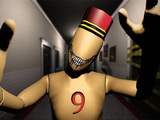







About Corridor 9 3D
Corridor 9 3D makes a hotel's ordinary layout into a reference image you carry in memory. A changed wall or displaced object tells you to reverse direction; an unchanged corridor tells you to continue. Progress depends on interpreting the room before choosing the next door.
How to Play Corridor 9 3D
Study the first corridor carefully, including wall colours and object positions. Compare each new passage against it. Walk back if you identify an anomaly and continue forward when the layout is unchanged, working toward corridor nine.
Controls
| Input | Action |
|---|---|
| WASD | Move |
| Mouse | Look |
| E | Open door |
| Shift | Run |
| Tab | Pause |
Building a Reference for Each Pass
The first corridor supplies the layout to compare against. Pick a few specific details, such as the wall colour and the position of a prominent object, rather than relying only on an overall feeling of familiarity. On a later pass, compare those same details before opening the next door.
An object in a different position or a changed wall is a reason to turn back. If the layout matches the reference, continue forward. This decision comes before opening the door: recognising the change after choosing a direction cannot undo that choice.
Running covers a familiar stretch faster, but it is still useful to slow down at the point where you need to compare the corridor against the reference.
Practical Tips
- Compare a few fixed reference points on every pass instead of relying on whether the whole room feels familiar.
- Make the direction decision before opening the next door; noticing a change afterward cannot correct the previous choice.
Frequently Asked Questions
Should I always move forward to increase the corridor number?
No. Reversing direction when an anomaly is present is part of the progression rule.