
Find the Ghost in the Photo Overview
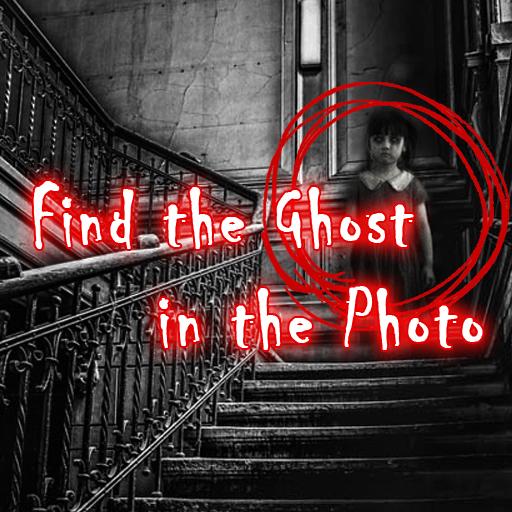
Find the Ghost in the Photo is a chilling hidden-object horror puzzle game that challenges you to do exactly what its title promises — find the ghost. Each level presents you with a static photograph: a dense forest at dusk, an abandoned house, a darkened corridor. Somewhere within that image, something is hiding. Something that shouldn't be there. Your job is to find it before time runs out.
The game's genius is in how it weaponizes photography against you. Photos are inherently ambiguous — full of shadows, shapes, and textures that the brain works hard to interpret. Find the Ghost in the Photo exploits this brilliantly. Shapes that look like figures. Shadows that seem to move. Details that feel wrong but are hard to pin down. The game makes you question your own perception, and that uncertainty is where the horror lives.
What elevates the experience beyond a simple hidden-object game is the layered design. Some levels include tools — zoom functions, light filters, visual effects — that let you examine the photograph in different ways, turning each image into a genuine investigative puzzle. Additional secrets and ghost stories can be unlocked by particularly sharp-eyed players, adding depth beyond the core find-and-click mechanic.
Find the Ghost in the Photo is ideal for players who enjoy horror that's psychological rather than graphic, and for anyone who loves the paranoid feeling of staring at something ordinary and slowly convincing themselves it isn't. If you've ever looked at a photo and felt like something was looking back, this game understands exactly what you mean.
Key Details
| Genre: | Horror Puzzle / Hidden Object |
| Difficulty Level: | Variable (escalates with levels) |
| Average Play Time: | 5–20 minutes per session |
| Best For: | Players who enjoy hidden object games, paranormal themes, and observation-based challenges |
How to Play Find the Ghost in the Photo
Getting Started
- Launch the game in your browser — no download required.
- Study each photo carefully before clicking — take in the full image before focusing on specific areas.
- Use your mouse or touchscreen to click on the location where you believe the ghost or supernatural anomaly is hidden.
- If the level provides tools (zoom, light filter, visual effects), use them to examine suspicious areas more closely.
- Find the ghost within the time limit to score points and advance to the next level.
Basic Controls
| Control | Action |
|---|---|
| Mouse Click / Screen Tap | Click on suspected ghost location |
| Zoom Tool (where available) | Enlarge sections of the photo for closer inspection |
| Light Filter / Effects (where available) | Reveal hidden details not visible in normal view |
Objective
Locate the ghost or supernatural sign hidden within each photo before the timer expires. Accurate, fast detection earns higher scores and unlocks the next level. Some levels contain additional hidden secrets — finding these unlocks bonus backgrounds and ghost story content.
Find the Ghost in the Photo Features & Highlights
- Psychologically effective horror — the static photo format creates genuine unease without relying on cheap jump scares
- Investigation tools — zoom, light filters, and visual effects transform some levels into proper detective puzzles
- Unlockable ghost stories and backgrounds — thorough players are rewarded with bonus narrative content that deepens the lore
- Time-pressured scoring system — faster, more accurate detection earns higher scores, creating a competitive layer for replayability
- Free and instantly playable — no download required; launch and play directly in your browser
Find the Ghost in the Photo Tips & Strategies
Beginner Tips
- Scan the whole photo before clicking anything. Jumping straight to guessing wastes clicks and time. Spend the first few seconds doing a full left-to-right sweep of the image.
- Look for shapes that don't quite fit. Ghosts in Find the Ghost in the Photo are typically hidden in areas where the natural visual noise of the scene — shadows, textures, foliage — can mask their form. Look for shapes that are almost right but slightly too deliberate.
- Use tools before committing to a click. If a level provides zoom or light filter options, use them on any area that looks suspicious before clicking — it saves clicks and time.
Advanced Strategies
- Learn where ghosts are commonly hidden by scene type. Forest levels tend to hide figures in tree lines or between trunks. Abandoned building levels often place ghosts in window frames, doorways, or mirrors. Recognizing these patterns speeds up detection significantly.
- Minimize wrong clicks deliberately. Incorrect clicks cost time and reduce your score. It's faster to spend an extra second confirming your suspicion than to click rashly and be wrong.
- Look for the ghost at the edges of your natural attention. Game designers tend to place hidden objects where players are least likely to look first — corners, peripheral areas, and spots visually competing with the photo's obvious focal point.
What to Watch Out For
- The obvious focal point is rarely where the ghost is — images are composed to draw your eye to specific areas, and ghost placement exploits this by hiding in the periphery. Fight the urge to click on the most prominent element.
- Timer anxiety leading to rushed clicks — the countdown can induce panic that causes hasty, inaccurate clicks. Take a breath, scan deliberately, and click with confidence rather than desperation.
Find the Ghost in the Photo Elements Explained
Photo & Ghost Detection System
The core of Find the Ghost in the Photo is its detection mechanic: study a static image and identify the hidden supernatural element within it. Photos are chosen and composed specifically to challenge perception — they feature scenes with inherent visual complexity (dense foliage, shadowed interiors, textured surfaces) that provide natural camouflage for hidden figures and anomalies. Ghost placement is deliberate and considered: figures blend into shadows, faces emerge from texture, shapes hide within shapes. The game tests your ability to override your brain's natural tendency to normalize ambiguous visual information. When you see something that "almost" looks like a face or a figure — that's usually exactly what it is. The detection system rewards players who trust their instincts and look at images skeptically rather than accepting them at face value.
Investigation Tools System
Some levels in Find the Ghost in the Photo provide investigation tools that transform the experience from a simple click-the-ghost task into a layered detection puzzle. Zoom functionality lets you magnify specific areas of the photo for detailed examination — useful when a shape in a distant corner looks suspicious but is too small to identify at normal size. Light filter tools alter the photo's contrast or color balance, revealing details hidden in shadow or washed out by overexposure. Additional visual effects may further manipulate the image to surface anomalies invisible in the standard view. Knowing when and how to use these tools effectively is a skill in itself — players who use them systematically on each photo will find ghosts faster and with fewer wasted clicks than those who rely solely on unaided observation.
Scoring & Progression System
Find the Ghost in the Photo uses a time-based scoring system that rewards both speed and accuracy. Each level has a time limit, and your score for that level is determined by how quickly you locate the ghost and how few incorrect clicks you make in the process. High scores unlock the next level and, for particularly thorough players, additional hidden secrets within some levels can be found that unlock bonus content — ghost stories and background lore that add narrative depth to the game's supernatural themes. The scoring system creates a natural incentive for replay: even after completing a level, the desire to improve your score and find any missed secrets encourages return visits. This replayability gives the game more longevity than its level count alone might suggest.
Find the Ghost in the Photo Frequently Asked Questions
Q: How do I click on the ghost?
A: Move your cursor over the area where you believe the ghost is hidden and click with your left mouse button (or tap on touchscreen). If you're correct, the level will register the detection and advance. If not, you'll lose a small amount of time and need to keep looking.
Q: What should I do if I can't find the ghost within the time limit?
A: Study the image systematically — left to right, top to bottom — rather than scanning randomly. Pay special attention to peripheral areas, shadows, and spots where shapes seem slightly off. Use any available tools before the time runs out.
Q: Is Find the Ghost in the Photo compatible with mobile devices?
A: Yes — the game supports both mouse and touchscreen interaction, making it playable on mobile devices as well as desktop and laptop computers.
Q: Can I save my progress?
A: The game is browser-based and level-based, so progress through unlocked levels may be maintained within your session or saved locally by the game. Check the main menu for any save or continue options.
Q: How do I unlock the ghost stories and bonus content?
A: Bonus content is unlocked by finding the additional hidden secrets present in some levels — these go beyond the primary ghost and require a more thorough examination of the photo. Completing levels with high accuracy and finding these extra details is the path to unlocking the full bonus content.
Games Like Find the Ghost in the Photo You Might Enjoy
If you like Find the Ghost in the Photo, you might also enjoy:
- Overnight Interview - it leans into eerie story clues, confined spaces, and slow-burn horror discovery.
- The Coffin of Andy and Leyley - it leans into eerie story clues, confined spaces, and slow-burn horror discovery.
- Human Expenditure Program - it leans into eerie story clues, confined spaces, and slow-burn horror discovery.