
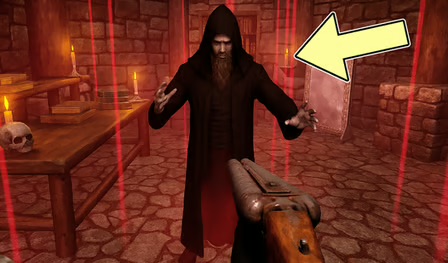







The Warlocks Prisoner Overview
The Warlock's Prisoner is a richly atmospheric puzzle adventure game that puts you inside the lair of an evil sorcerer with one clear goal: escape. Imprisoned by a powerful warlock, you must use your wits, your patience, and your powers of observation to explore each room, uncover hidden secrets, and solve the riddles standing between you and freedom.
What makes The Warlock's Prisoner exceptional is its commitment to puzzle design over spectacle. The game doesn't rely on jump scares or action sequences — instead, it builds tension through mystery and the satisfying slow unraveling of each chamber's secrets. Every room is a puzzle in itself, filled with objects to examine, passages to discover, and clues that only make sense when combined with something found elsewhere.
The game's magical setting — dark stone chambers, arcane artifacts, glowing runes, and hidden corridors — creates an immersive atmosphere that makes exploration feel genuinely rewarding. Uncovering a secret tunnel or figuring out the correct combination for a locked chest delivers a sense of accomplishment that keeps players pushing forward.
The pacing is entirely player-controlled, which means The Warlock's Prisoner rewards patience and careful thinking over speed. This makes it ideal for players who enjoy escape room-style logic puzzles, point-and-click adventure games, and story-driven exploration with a dark fantasy flavor. If you've ever wanted to outwit a sorcerer using only your intelligence and observation skills, this is your game.
Key Details
| Genre: | Puzzle Adventure / Escape Room |
| Difficulty Level: | Medium to Hard |
| Average Play Time: | 30–90 minutes |
| Best For: | Players who enjoy escape room puzzles, point-and-click adventures, and dark fantasy settings |
How to Play The Warlocks Prisoner
Getting Started
- Launch the game in your browser and take in your starting environment — examine everything you can see before moving on.
- Click (or tap on mobile) on objects, doors, and environmental details to interact with them and reveal clues or items.
- Collect treasures and key items as you find them — they'll often be needed to solve puzzles in other rooms.
- If you're stuck in a room, look for hidden passages or revisit areas you've already explored with fresh eyes.
- Combine clues from different rooms to unlock doors, chests, and secret areas that advance your escape.
Basic Controls
| Control | Action |
|---|---|
| Mouse Click (PC) | Interact with objects, doors, and environment |
| Screen Tap (Phone/Tablet) | Interact with objects and select actions |
Objective
Escape the warlock's lair by systematically exploring each chamber, collecting items, and solving the puzzles that block your path. Progress requires linking clues found across multiple rooms — no single area will give you everything you need. Work logically through each challenge, think creatively about how to use objects, and find the exit.
The Warlocks Prisoner Features & Highlights
- Immersive dark fantasy setting — detailed, atmospheric rooms bring the warlock's lair to life with a compelling magical aesthetic
- Interconnected puzzle design — clues and solutions span multiple rooms, rewarding thorough exploration and lateral thinking
- Hidden passages and secret areas — the lair conceals more than it shows; discovery is a constant source of satisfaction
- No time pressure — play at your own pace, think carefully, and solve puzzles without artificial urgency
- Free to play — the full experience is available at no cost through the fnaf3.io online gaming platform
The Warlocks Prisoner Tips & Strategies
Beginner Tips
- Examine every detail in a room before moving on. Click on walls, floor objects, decorations, and furniture — even things that look purely atmospheric may hide interactable clues.
- Return to earlier rooms when you're stuck. A locked door or unsolved puzzle in one room often requires an item or clue from a room you've already visited. Backtracking is never wasted time.
- Try combining items in unexpected ways. The game occasionally requires using objects in non-obvious ways. If something isn't working as you'd expect, think about what else it could be used for.
Advanced Strategies
- Track which items you've collected and where. As your inventory grows, keeping a mental (or written) note of what you have and where you found it helps you connect solutions to the right puzzles faster.
- Look for visual patterns in the environment. Runes, colors, and repeated symbols in the décor often encode solutions to combination locks and coded puzzles. The answers are in the room design itself.
- Approach combination puzzles by elimination. If you're close on a combination but not sure of the exact solution, work through logical variants of the clues you have rather than guessing randomly.
What to Watch Out For
- Missing interactable objects — the game's atmospheric art style means some clue-bearing objects blend into the environment. Click thoroughly on everything, not just obvious items.
- Misinterpreting clues — some clues require a lateral leap in thinking rather than a direct reading. If your first interpretation isn't working, try reading the clue differently or consider what it symbolizes.
The Warlocks Prisoner Elements Explained
Exploration & Clue System
Exploration is the core activity of The Warlock's Prisoner, and the clue system is what gives it structure. Every chamber contains interactive objects — some yield items you'll carry with you, others reveal written clues, and still others change the environment in subtle ways. The crucial design principle is that clues are almost never self-contained: a clue found in one room applies to a puzzle in another. This means thorough exploration isn't just helpful — it's mandatory. Players who rush through rooms without examining everything will find themselves stuck on puzzles they don't have the information to solve. The game rewards a methodical approach: treat each room as a source of information, catalogue what you find, and look for connections across the spaces you've visited.
Inventory & Item Usage System
As you explore the warlock's lair, you'll collect treasures, keys, tools, and other items that can be used to unlock new areas or solve specific puzzles. The inventory system is intentionally simple — items are collected and held until needed — but the challenge lies in figuring out which item belongs where. Items sometimes have obvious uses (a key opens a lock) and sometimes need to be applied creatively (an object might be used as a tool in a way you didn't anticipate). The game doesn't highlight when an item is being used correctly, so expect some trial and error. Revisiting earlier rooms with new items in your inventory is often the key to breaking through plateaus, as a door that was previously impassable may now be openable.
Room & Puzzle Progression System
The Warlock's Prisoner is structured as a series of connected rooms, each with its own puzzle logic and environmental story. Progression isn't strictly linear — solving one room may open access to two or three others, and the path through the lair branches in ways that require you to manage multiple partial solutions simultaneously. Some chambers contain puzzles that can't be fully solved until you've gathered information from rooms you haven't yet visited, encouraging you to think of the lair as an interconnected whole rather than a sequence of isolated challenges. The game also features hidden tunnels and secret passages that only reveal themselves once certain conditions are met — rewarding players who explore thoroughly rather than moving straight toward obvious exits.
The Warlocks Prisoner Frequently Asked Questions
Q: How do I interact with objects in the game?
A: On PC, click your mouse directly on any object, door, or environmental detail to interact with it. On phone or tablet, tap the item on your screen. If something looks potentially interactable, click or tap it — the game is generous with interactive elements.
Q: What should I do if I'm completely stuck and can't progress?
A: Go back and thoroughly re-examine every room you've visited, clicking on every object — even ones you've interacted with before. Also check your inventory for items you may not have applied yet. If a puzzle won't budge, try approaching it from a different angle and re-reading any clues in the room carefully.
Q: Is The Warlock's Prisoner compatible with mobile devices?
A: Yes — the game is designed for both PC (mouse) and phone/tablet (touchscreen) play. The control scheme automatically adapts to your device, so no additional setup is required.
Q: Can I save my progress?
A: The Warlock's Prisoner is a browser-based game. Progress may be maintained within your current browser session. Check the in-game menu for any save or resume functionality if you plan to return to the game after closing your browser.
Q: How do I unlock secret passages?
A: Secret tunnels in the lair typically reveal themselves after you've met specific conditions in other rooms — solving a puzzle, collecting an item, or triggering an environmental change. Keep exploring and experimenting; secret passages open naturally as you advance through the game's puzzle logic.
Games Like The Warlocks Prisoner You Might Enjoy
If you like The Warlocks Prisoner, you might also enjoy:
- Saw 4 Trapped Online - it offers another tense escape route built around puzzles, danger, and careful exploration.
- Cabin Horror - it offers another tense escape route built around puzzles, danger, and careful exploration.
- Portrait of an Obsession a Forgotten Hill Tale - it offers another tense escape route built around puzzles, danger, and careful exploration.