



Five Nights at Freddy's: Virtual_Cams Overview
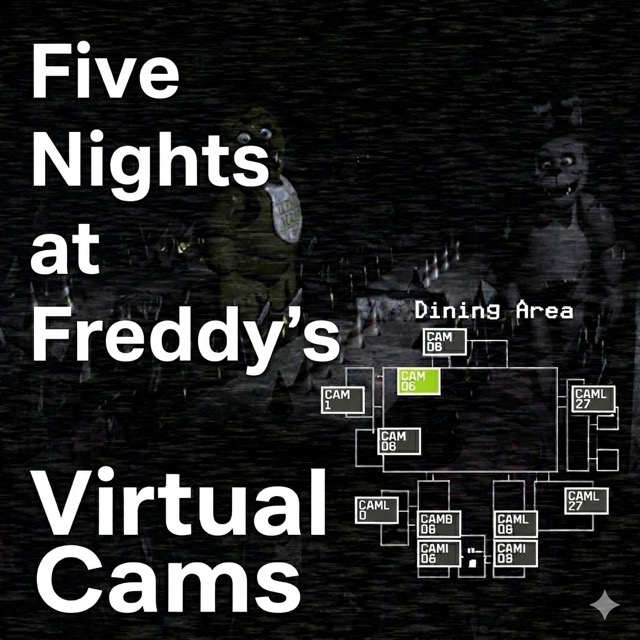
Five Nights at Freddy's: Virtual_Cams flips the franchise's formula on its head in the most unexpected way possible — instead of hiding from animatronics, you control them. This fan-made creative sandbox puts the camera network front and center, transforming a survival mechanic into a full gameplay system that lets you direct Freddy, Bonnie, Chica, and Foxy across the map like a scene director calling the shots.
The result is something genuinely unique in the FNAF ecosystem. Virtual_Cams strips away the survival pressure, power management, and jump-scare defense of traditional entries and replaces them with an open-ended creative experience. You choose which animatronic to move, select their destination via the camera feed, and watch the simulation unfold. Add visual effects, trigger hallucination sequences, and construct custom scenarios that exist purely for the joy of building them.
This makes Virtual_Cams a particularly natural fit for content creators — YouTubers, streamers, and FNAF-themed video producers who want a tool for staging their own scenes without the constraints of survival gameplay. But it's equally rewarding for fans who simply want to explore the FNAF world from a position of control rather than fear.
The game's experimental spirit is part of its appeal. There are no defined win conditions, no timers, and no failure states to worry about. The camera system is your instrument, the animatronics are your cast, and the pizzeria is your stage. What you create within that space is entirely up to you.
Key Details
| | | |---|---| | Genre | Creative Sandbox / Fan-Made Simulation | | Difficulty Level | Easy — no survival pressure or failure states | | Average Play Time | Open-ended — 10 minutes to hours depending on creative goals | | Best For | FNAF fans, content creators, players who prefer creative and experimental gameplay over survival challenges |
How to Play Five Nights at Freddy's: Virtual_Cams
Getting Started
1. Open the camera network to view the full pizzeria map and all available camera feeds. 2. Select the animatronic you want to control by holding their designated key (B for Bonnie, C for Chica, F for Freddy). 3. While holding the key, right-click on your target camera to designate a destination for that animatronic. 4. Left-click to execute the move and watch the animatronic travel to the selected location. 5. For Foxy, navigate to the East Hallway camera and interact with the "YOU" marker to trigger his movement — he operates differently from the other three.
Basic Controls
- Hold B — Select and control Bonnie
- Hold C — Select and control Chica
- Hold F — Select and control Freddy
- Right-click on camera — Designate destination for the selected animatronic
- Left-click — Confirm and execute the move
- Ctrl — Trigger visual effect or hallucination sequence
- Shift — Activate alternative special effect
- East Hallway / "YOU" Marker — Unique interaction point for controlling Foxy
Objective
There is no traditional objective. Virtual_Cams is a creative sandbox — you direct animatronics across the map using the camera system, construct custom scenarios, activate visual effects, and experiment freely with the simulation. The goal is whatever you bring to it, whether that's building a specific scene, experimenting with movement patterns, or creating content for an audience.
Five Nights at Freddy's: Virtual_Cams Features & Highlights
- Full animatronic control system — Direct Freddy, Bonnie, Chica, and Foxy individually across the entire pizzeria map using intuitive camera-based input
- Camera network as primary gameplay — The iconic FNAF surveillance system becomes an interactive stage director's tool rather than a defensive resource
- Visual effects and hallucination triggers — Activate dramatic close-up scares and atmospheric illusion effects using Ctrl and Shift for cinematic creative use
- No survival pressure — Power limits, jump-scare defenses, and failure states are removed entirely, creating a pure creative sandbox
- Content creator-friendly design — The free-form control and visual effects system is purpose-built for producing FNAF-themed videos, roleplay sessions, and experimental content
Five Nights at Freddy's: Virtual_Cams Tips & Strategies
Beginner Tips
- Start by experimenting with one animatronic at a time before trying to manage multiple characters simultaneously — understanding each character's movement behavior individually makes multi-character choreography much easier.
- Explore every camera on the map before making your first moves — knowing the full layout helps you plan meaningful positioning across the whole network.
- Try the Ctrl and Shift effects early to understand the visual options at your disposal before building any scenes around them.
Advanced Strategies
- For content creation, pre-plan a loose sequence of animatronic positions before recording — improvised sessions are fun, but scripted movement creates more watchable, structured content.
- Combine simultaneous animatronic movement with timed visual effects to create the impression of coordinated behavior that feels narrative-driven.
- Use Foxy's unique East Hallway mechanic as a dramatic punctuation point in staged scenarios — his different control method makes him feel distinct and can serve as an effective scene climax.
What to Watch Out For
- Moving characters too quickly without a creative goal — Virtual_Cams is most rewarding when approached with intention. Random movement can feel hollow fast; having even a loose concept for a scenario gives the session direction.
- Forgetting Foxy's unique controls — Foxy doesn't follow the same click-to-move system as the other three. Players who try to control him the same way will find him unresponsive until they locate and interact with the East Hallway "YOU" marker.
Five Nights at Freddy's: Virtual_Cams Elements Explained
Camera-Based Control System
The camera network is the entire interface through which you interact with Virtual_Cams. Rather than using cameras defensively to track threats, you use them offensively — as a director would use monitors on a film set. Each camera corresponds to a physical location in the pizzeria, and by selecting a destination on the network while holding an animatronic's key, you send that character there. The system is intentionally simple to operate but surprisingly deep in practice, because the real creativity comes from sequencing movements, timing arrivals, and arranging characters in relation to one another. Mastering the camera system means developing a spatial understanding of the pizzeria layout and a sense of how animatronic positions interact visually when multiple characters are on screen simultaneously.
Visual Effects System
Virtual_Cams includes a suite of visual effects triggered by Ctrl and Shift that dramatically expand the creative atmosphere available to players. These effects include sudden close-up hallucination events and illusion sequences that overlay the standard camera feed with disorienting visuals. For survival-focused FNAF games, these moments represent fear — but in Virtual_Cams, they're tools for storytelling. A well-timed visual effect can punctuate a scene, create atmosphere, or serve as a narrative beat in a recorded video. Understanding the full range of available effects and experimenting with their timing in relation to animatronic positioning is where the simulation's creative ceiling reveals itself to be much higher than its simple interface initially suggests.
Foxy's Unique Interaction
Unlike Freddy, Bonnie, and Chica — who share the same hold-key-and-click control method — Foxy operates through a dedicated interaction point called the "YOU" marker, located in the East Hallway camera view. This marker represents the security office and functions as the trigger point for Foxy's movement. Interacting with it initiates Foxy's characteristic dash behavior, making him feel distinct from his counterparts in both control and character. This mechanical difference isn't just a quirk — it's an opportunity. In staged scenarios, Foxy's unique movement style and control method make him a natural choice for dramatic moments that require a different energy from the other animatronics' more placement-based behavior.
Five Nights at Freddy's: Virtual_Cams Frequently Asked Questions
Q: How do I move Freddy to a specific camera location?
A: Hold the F key to select Freddy, then right-click on the camera location you want him to move to. Finally, left-click to confirm and execute the move. Freddy will travel to the designated location on the map.
Q: What should I do if Foxy isn't responding to my controls?
A: Foxy uses a different control method from the other animatronics. Navigate to the East Hallway camera feed and look for the "YOU" marker, which represents the security office. Interacting with this marker triggers Foxy's movement. The standard hold-key-and-click method does not work for him.
Q: Is Virtual_Cams compatible with standard web browsers?
A: As a fan-made browser-based game, Virtual_Cams is designed to run in modern desktop browsers without additional installation. Performance may vary depending on your browser and system specifications; using an updated browser with hardware acceleration enabled is recommended.
Q: Can I save scenarios or session recordings?
A: Virtual_Cams does not include a built-in save or recording system. Content creators who want to capture their sessions should use external screen recording software such as OBS Studio or similar tools to capture and save their created scenarios.
Q: How do I trigger the hallucination and visual effects?
A: Press Ctrl or Shift during gameplay to activate the available visual effects. These include close-up scare events and hallucination sequences that overlay the camera feed. Experiment with both keys to discover the full range of effects and find the right timing for your creative scenarios.
Games Like Five Nights at Freddy's: Virtual_Cams You Might Enjoy
If you like Five Nights at Freddy's: Virtual_Cams, you might also enjoy:
- Five Nights at Freddy's - it shares the same animatronic pressure, survival timing, and quick browser play rhythm.
- Five Nights at Freddy's 2 - it shares the same animatronic pressure, survival timing, and quick browser play rhythm.
- Five Nights at Freddy's 3 - it shares the same animatronic pressure, survival timing, and quick browser play rhythm.