



FNAF Shooter Overview
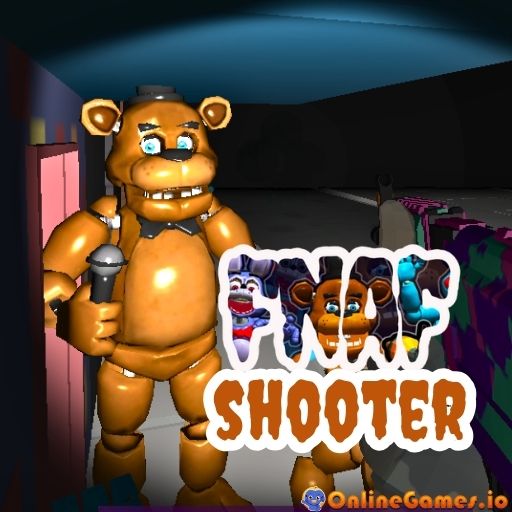
The cameras are gone. The locked office is gone. This time, you're not hiding — you're fighting back. FNAF Shooter takes the Five Nights at Freddy's universe and throws out the passive survival formula entirely, replacing it with a fast-paced first-person shooter where you grab a weapon, step into the darkness, and take the fight to the animatronics head-on.
The setting is still the world you know — the dim corridors, the flickering lights, the unsettling cheerfulness of a place designed for children that has gone deeply wrong. But where the classic games asked you to endure, FNAF Shooter asks you to act. Animatronics close in from every direction. You need to shoot them before they reach you. The atmosphere is still tense, the jumpscares still land, and the creeping dread of the source material is preserved — only now you have something to do about it.
The game runs through multiple waves of increasing intensity, with animatronics growing faster and more aggressive as you progress. Ammo is finite and must be managed carefully — spraying wildly will leave you defenseless at the worst possible moment. Weapons can be switched on the fly, and grenades provide a last-resort area-clearing option when enemies overwhelm your position. For players who've always wanted to answer the knocking at Freddy's door with a magazine rather than a closed panel, this is exactly that game.
Key Details
- Genre: Survival Horror / First-Person Shooter
- Difficulty Level: Variable (scales with each wave)
- Average Play Time: 15–25 minutes per run
- Best For: Action-horror fans who want fast reflexes and combat over camera management
How to Play FNAF Shooter
Getting Started
1. Begin each stage by familiarizing yourself with the layout — identify chokepoints and areas of open space where animatronics tend to cluster. 2. Keep moving and avoid staying stationary for long periods; animatronics will converge on your position if you hold still. 3. Aim for the head or central mass of each animatronic for the most efficient damage output. 4. Manage your ammo actively — switch to a secondary weapon rather than reloading mid-fight when enemies are close. 5. Survive each wave and push through all stages to complete the game.
Basic Controls
- WASD: Move
- Mouse: Look around and aim
- Left Mouse Button: Shoot
- Right Mouse Button (Hold): Aim down sights
- Shift (Hold): Sprint
- Space: Jump
- F: Melee attack (for close-range emergencies)
- G: Throw grenade
- Mouse Wheel / Keys 1–7: Switch between weapons
- R: Reload
- T: Inspect weapon
Objective: Survive each wave of animatronic enemies by shooting them before they reach you. Clear all waves in each stage to progress. Don't let enemies close the distance.
FNAF Shooter Features & Highlights
- Full first-person shooter combat — active, weapon-based gameplay replaces the passive camera monitoring of traditional FNAF
- Multi-weapon loadout — seven weapon slots with distinct tools including firearms, melee, and grenades for varied tactical options
- Wave-based escalation — each successive wave increases animatronic speed and aggression, steadily raising the pressure across a full run
- FNaF atmosphere preserved — familiar animatronic characters and environments keep the horror tone intact within the action format
- Ammo management tension — finite ammunition adds a resource pressure layer that prevents the game from becoming a mindless shooting gallery
FNAF Shooter Tips & Strategies
Beginner Tips
- Use sprint sparingly — it's most valuable for repositioning between cover points when enemies flank you, not for general movement. Burning sprint constantly leaves you without an escape option when you need it.
- Switch weapons instead of reloading mid-fight. Reloading while an animatronic is closing on you is a frequent cause of death — swap to a secondary and finish the threat, then reload the primary when you have breathing room.
- Use the melee attack only as an absolute last resort. It's useful when an enemy gets within arm's reach and you have no time to shoot, but relying on it regularly puts you in unnecessary danger.
Advanced Strategies
- Identify and control chokepoints in each map. Corridors and doorways funnel animatronics into predictable lines of approach — positioning yourself to cover a chokepoint lets you handle multiple enemies with focused fire rather than spinning to track threats from all directions.
- Save grenades for clustered groups, not single targets. A grenade used on one animatronic is wasted; the same grenade on four enemies clustered at a doorway is a game-changing moment.
- Learn the wave composition for each stage. Certain waves introduce faster or more durable animatronic types — anticipating what's coming lets you switch to the most effective weapon before the new enemies arrive rather than reacting after they've already closed distance.
What to Watch Out For
- Don't run out of ammo in the middle of a wave. Monitor your ammo count on the HUD and reload or switch weapons proactively between engagements, not reactively when your gun clicks empty at the worst moment.
- Don't backpedal into walls. Players who retreat from enemies while shooting frequently pin themselves against geometry with no escape route. Always move laterally or toward an open space when falling back.
FNAF Shooter Elements Explained
Weapon System: FNAF Shooter provides a multi-slot weapon loadout covering seven weapon positions, switchable at any time using the mouse wheel or number keys. Each weapon occupies a different tactical role — primary firearms handle medium-range sustained fire, while secondary weapons provide faster draw speeds for close-range reactions. The melee attack (F key) offers a zero-ammo option for emergency close-range situations, though its short range makes it a high-risk choice. Grenades (G key) provide the only area-effect damage in the game, making them uniquely valuable against grouped enemies. Weapon switching fluency — knowing which tool is right for each encounter and transitioning without hesitation — is one of the most important skills to develop across a full run.
Wave Structure: Each stage in FNAF Shooter is divided into discrete enemy waves. A new wave begins after all animatronics in the previous wave have been eliminated. Early waves feature slower, less durable enemies that allow players to establish positioning and ammo management habits. Later waves introduce faster animatronic variants, larger numbers per wave, and more unpredictable approach patterns that test the habits built in earlier stages. The HUD displays both current health (bottom left) and current ammo count (bottom right), giving you the information needed to make decisions between and during waves. Clearing all waves in a stage advances you to the next level.
Ammo Management: Unlike many FPS games where ammunition is abundant, FNAF Shooter treats ammo as a finite and meaningful resource. Each weapon carries a limited magazine and a limited reserve, and resupply is not guaranteed between waves. Running a primary weapon dry at a critical moment — with no secondary ready and a grenade already thrown — is one of the most common ways runs end. The discipline of monitoring ammo, reloading between fights rather than during them, and selecting weapons based on remaining reserves rather than habit is what separates efficient runs from desperate ones. Treat every shot as a decision, not a reflex.
FNAF Shooter Frequently Asked Questions
Q: How do I switch between weapons quickly?
A: Use the mouse wheel to cycle through your equipped weapons, or press number keys 1 through 7 to jump directly to a specific weapon slot. Switching is faster than reloading, so develop the habit of swapping to a loaded weapon when your current one runs dry mid-fight.
Q: What should I do if animatronics surround me?
A: Use a grenade if you have one — it's the only tool that deals area damage and can clear a cluster quickly. If no grenade is available, sprint through the group to break the encirclement and find open space, then re-engage from a position where enemies are approaching from one direction rather than all sides.
Q: Is FNAF Shooter compatible with controllers?
A: The game is designed for mouse and keyboard input. Controller support may vary depending on the browser and platform — keyboard and mouse is recommended for the most responsive experience.
Q: Can I save my progress?
A: Progress within a run is continuous, but completing or failing a stage typically returns you to a stage select or restart point. Check the in-game menu for any available save or checkpoint system.
Q: How do I unlock new content?
A: Defeating animatronics earns in-game coins, which can be used to unlock new playable characters. Focus on accuracy and wave completion to maximize coin earnings per run.
Games Like FNAF Shooter You Might Enjoy
If you like FNAF Shooter, you might also enjoy:
- FNAF Strike - it shares the same animatronic pressure, survival timing, and quick browser play rhythm.
- FNAF Shooter 2 - it shares the same animatronic pressure, survival timing, and quick browser play rhythm.
- FNAF Unblocked - it shares the same animatronic pressure, survival timing, and quick browser play rhythm.