





About Brother Wake Up
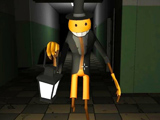
Brother Wake Up is a house search built around a broken clock and a cursed sleep. To help your brother wake up, you must find the clock's scattered parts and return them through a glowing portal. The Clockmaker's minions roam the house, and each encounter costs one of your three chances.
Find and Return Clock Parts
Start by opening the locker and taking the first clock piece. Carry it to the glowing portal and throw it in. That first trip establishes the place you need to return to while exploring the rest of the house.
Search cupboards, wardrobes and other storage furniture for more pieces and useful items. When you enter a new room, take a moment to note its doorway and the route back toward the portal. A good search covers the furniture in one area before moving on, so you can distinguish a room you have searched from one you only passed through.
Avoid the Clockmaker's Minions
The house search is not just a collection puzzle: a scare from a minion costs a life, and the run gives you three chances. Keep room entrances in view when approaching a cupboard, and be ready to move away if a minion interrupts your search. Once the route is clear, return to the specific storage spot you were checking rather than restarting the entire circuit.
Use the flashlight to see the area you are examining. The inventory gives you a way to inspect what you are carrying while you decide whether to search farther or return to the portal.
Controls
| Input | Action |
|---|---|
| WASD | Move |
| Mouse | Look |
| E | Take or throw an item |
| F | Interact |
| Right mouse button | Flashlight |
| 1 | Inventory |
Practical Tips
- Use the first piece's trip to learn the location of the portal.
- Check storage systematically, but leave a route out of the room.
- After a scare, resume from the last unchecked area instead of wandering through already searched rooms.
Frequently Asked Questions
What happens after three scares?
Each scare costs a chance. Losing all three ends the attempt before the clock can be repaired.