






Last Seen Online Overview
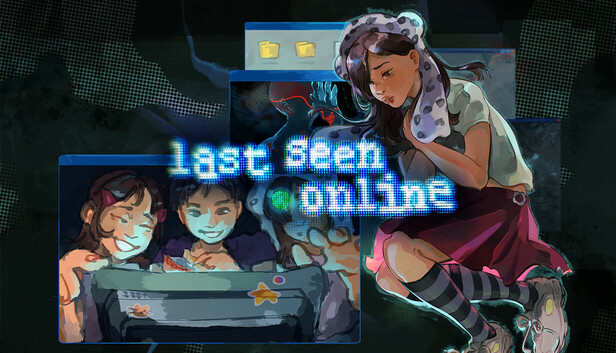
Last Seen Online is a deeply atmospheric browser-based horror puzzle game that unfolds entirely through the interface of an old, forgotten computer. You play as Bob, an ordinary person who stumbles upon an unformatted machine and decides to power it on — only to find himself drawn into the haunting mystery of a girl named Lit, who has seemingly vanished from the online world without a trace.
What sets Last Seen Online apart is its storytelling format. Rather than traditional gameplay environments, the entire experience takes place through files, folders, messages, playlists, and digital artifacts found on the computer. It's a game about reading between the lines — piecing together who Lit was, what happened to her, and why someone wants her forgotten. The further you dig, the stranger and more unsettling the mystery becomes.
The game weaves psychological horror with intricate puzzle-solving in a way that feels genuinely immersive. Cracking passwords, decoding clues hidden in music playlists, chatting with mysterious characters like Orion, and eventually accessing a hidden virtual space called "UT War" — every discovery feels earned and meaningful. The story rewards patience, observation, and a willingness to explore every digital corner.
Last Seen Online is ideal for players who love narrative-driven experiences, escape room-style puzzle logic, and horror that creeps up on you slowly rather than hitting you over the head. If you enjoy losing yourself in a story and piecing together the truth one clue at a time, this game will grip you from the first boot-up screen.
Key Details
| Genre: | Horror Puzzle / Narrative Mystery |
| Difficulty Level: | Medium to Hard |
| Average Play Time: | 60–120 minutes |
| Best For: | Players who enjoy story exploration, psychological horror, and lateral-thinking puzzles |
How to Play Last Seen Online
Getting Started
- Launch the game in your browser and watch Bob boot up the old computer.
- Explore the desktop — click on icons, open files, and read through any available documents and images.
- Gather clues by carefully reading messages, examining photos, and listening to playlists for hidden meaning.
- Use clues you've found (like a pet's name or a birth year) to crack password-protected files and unlock new areas of the mystery.
- Interact with other characters via chat, analyze the information they share, and use it to advance the story.
Basic Controls
| Control | Action |
|---|---|
| Mouse Click | Interact with files, icons, and interface elements |
| Keyboard | Enter passwords and type in chat interactions |
Objective
Uncover the truth behind Lit's disappearance by thoroughly exploring the computer's contents, solving password puzzles, and interacting with the characters you encounter online. Your ultimate goal is to piece together enough information to access "UT War" — the hidden virtual space where the deepest secrets about Lit are finally revealed.
Last Seen Online Features & Highlights
- Unique desktop-based storytelling — the entire game unfolds through a simulated computer interface, creating exceptional immersion
- Rich narrative mystery — a compelling, layered story about identity, disappearance, and the digital footprints we leave behind
- Multi-layered puzzle design — passwords, playlists, chat interactions, and hidden files all serve as clues that interconnect
- Memorable characters — interact with Orion and others whose conversations yield crucial story information and puzzle solutions
- Free and browser-based — no download or installation required; play the full experience directly in your browser
Last Seen Online Tips & Strategies
Beginner Tips
- Read everything. No file on the desktop is there by accident — documents, images, and message logs all contain details that may unlock something later.
- Write down passwords and clues as you find them. The game expects you to remember or reference information across multiple puzzles, so keeping notes is essential.
- Don't rush the chat interactions. Conversations with characters like Orion contain both story content and puzzle hints — read carefully before moving on.
Advanced Strategies
- Connect seemingly unrelated clues. A name mentioned in a music playlist might be the key to a locked document. Last Seen Online rewards players who draw connections across different file types.
- Revisit files after unlocking new information. Something you read early on may take on new meaning once you've discovered more of the story. Re-reading is never wasted.
- Think about real-world password logic. The game's password puzzles mirror how real people choose passwords — pet names, birthdays, meaningful words. Think like the person who set the password.
What to Watch Out For
- Don't skip files that seem unimportant — some of the most critical clues are buried in files that appear mundane at first glance. Assume everything matters.
- Missing chat cues can stall your progress — if you're stuck on a puzzle, go back and re-read your conversations; you may have overlooked a hint embedded in the dialogue.
Last Seen Online Elements Explained
Password & Lock Puzzle System
The password puzzle system is Last Seen Online's primary challenge mechanic. Throughout the game, you'll encounter locked files, folders, and areas that require specific passwords to open. These passwords are never arbitrary — they're always derivable from clues found elsewhere on the computer or in conversations. Typical password logic includes personal details like a pet's name, a significant date or birth year, a meaningful word from a playlist, or information shared by another character. The system rewards thorough exploration: players who read every file and pay attention to every detail will find passwords more naturally, while players who skip content will find themselves stuck without knowing why. The satisfaction of cracking a lock using information you pieced together yourself is a core pleasure of the game.
Character Interaction System
Last Seen Online features an online chat system where Bob can interact with other characters — most notably a figure named Orion. These interactions are not just atmospheric; they're functionally critical to progression. Characters share information, ask questions, and respond to what you know, and the conversations often contain puzzle hints or story revelations that can't be found in the files alone. Engaging thoughtfully with characters and reading their messages carefully is essential. The system also reflects the game's broader theme of online communication — the way people reveal themselves (or conceal themselves) through digital conversation. Pay attention to what characters choose not to say as much as what they do say.
Virtual World: UT War
UT War is the hidden virtual area that lies at the heart of Last Seen Online's mystery. It's not accessible from the start — you must uncover enough information and meet specific conditions during your exploration before Bob can enter this space. Once inside, UT War shifts the game's tone and reveals deeper secrets about Lit that couldn't be discovered through the computer's files alone. Think of it as the game's final layer: the physical digital world (the computer files) leads to the virtual digital world (UT War), where the truth waits. Getting to UT War is one of the game's major milestones, and what you find there recontextualizes much of what you've already discovered.
Last Seen Online Frequently Asked Questions
Q: How do I crack a password-protected file?
A: Look for personal details about the file's owner scattered throughout the computer — these include things like a pet's name, a birth year, or a significant word from a message or playlist. Combine clues from multiple sources and try the most personally meaningful information first.
Q: What should I do if I'm completely stuck?
A: Go back and re-read files and chat logs you may have skimmed. Last Seen Online is designed so that all necessary information is available in the game — if you're stuck, a clue you've already encountered holds the answer. Notes you've taken will also help you cross-reference details.
Q: Is Last Seen Online compatible with mobile devices?
A: The game runs in a web browser, making it accessible on most devices. However, given the volume of reading and file interaction involved, a desktop or laptop experience is recommended for the best play experience.
Q: Can I save my progress?
A: Last Seen Online is a browser-based game. Depending on the platform, progress may be saved automatically within your browser session. Check the in-game interface for any save or resume functionality.
Q: How do I access UT War?
A: UT War becomes accessible once you've gathered sufficient information through the computer's files and character interactions. Continue exploring thoroughly, solve the puzzles you encounter, and the path to UT War will open naturally as the story progresses.
Games Like Last Seen Online You Might Enjoy
If you like Last Seen Online, you might also enjoy:
- Overnight Interview - it leans into eerie story clues, confined spaces, and slow-burn horror discovery.
- The Coffin of Andy and Leyley - it leans into eerie story clues, confined spaces, and slow-burn horror discovery.
- Human Expenditure Program - it leans into eerie story clues, confined spaces, and slow-burn horror discovery.