


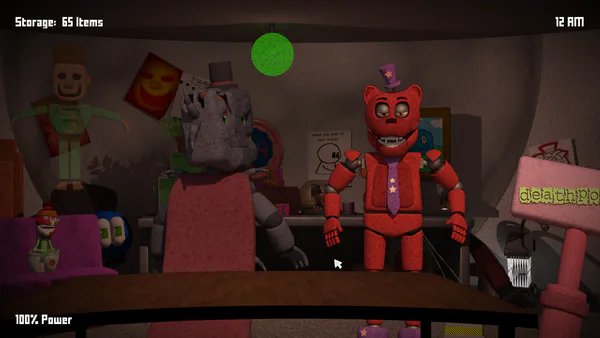





FNAF Free 2 Overview
FNAF Free 2 builds on the survival horror foundations of the original and sharpens them into something faster, more demanding, and more tool-dependent than what came before. You return to the night guard role — isolated in an office, camera feeds as your only window into the building, and animatronics that become more active and unpredictable as the hours pass. But Free 2 changes the balance of how you survive. Passive barriers matter less here. Timing and the intelligent use of available tools matter more.
The shift is deliberate and meaningful. Where early FNAF games rewarded careful rationing of a static set of defenses, Free 2 asks you to make active decisions with your tools in real time — deploying the flashlight at exactly the right moment, switching camera feeds quickly enough to stay ahead of sudden movement, and reading the rhythm of each night to anticipate escalations before they catch you unprepared.
Each night ratchets up the tension in concrete ways. Animatronics move more frequently, respond to inactivity faster, and leave shorter windows between dangerous approaches. The tools available to you don't change — but your execution of them needs to improve consistently to keep pace with the difficulty curve. Players who plateau in their response speed and decision timing on Night 2 will find Night 4 genuinely unforgiving.
Free 2 is the FNAF experience for players who want the classic formula but with an emphasis on active skill development over passive endurance. Observation, timing precision, and the discipline to save your tools for when they're actually needed rather than burning them at the first sign of movement — these are the qualities that carry you through to morning.
Key Details
| | | |---|---| | Genre | Survival Horror / Strategy | | Difficulty Level | Medium to Hard — escalates sharply on later nights | | Average Play Time | 10–20 minutes per night | | Best For | FNAF fans, survival horror players, players who enjoy timing-based tool use and escalating challenge |
How to Play FNAF Free 2
Getting Started
1. Begin each night in your security office with access to the camera system — take the first few moments to locate each animatronic's starting position before they begin moving. 2. Switch between camera feeds regularly to track animatronic movement across the building and identify any that are advancing toward the office. 3. Use your flashlight at the correct moment to manage specific threats — timing the deployment precisely is more effective than using it preemptively or reactively too late. 4. React quickly to sudden changes in animatronic activity — Free 2's pacing rewards fast responses over methodical deliberation during high-activity moments. 5. Stay alert from midnight through early morning, maintaining your monitoring rotation even when activity appears to have quieted — lulls are often immediately followed by escalations.
Basic Controls
- Mouse — Navigate between camera views and interact with the office environment
- Quick Clicks — Activate tools and defensive options at the right moment
- Flashlight — Deploy via dedicated control to manage specific threats with precise timing
Objective
Survive each night by monitoring animatronic movement through the camera system and deploying available tools — particularly the flashlight — at the correct moment to prevent threats from reaching the office. Maintain vigilance from midnight until early morning across all nights, improving reaction speed and decision timing as the difficulty escalates.
FNAF Free 2 Features & Highlights
- Tool-and-timing gameplay emphasis — Active, precise tool deployment replaces passive barrier reliance as the primary survival mechanic, rewarding execution over endurance
- Dynamic camera monitoring — Fast camera switching and movement pattern recognition are core skills that develop meaningfully across multiple sessions
- Escalating night difficulty — Each night introduces faster animatronic movement and tighter reaction windows, demanding genuine improvement rather than strategy repetition
- Flashlight as primary active tool — Precise flashlight timing is the game's central skill challenge — using it too early or too late is as costly as not using it at all
- Accessible controls with high skill ceiling — Simple mouse-based input and quick-click interactions are easy to learn but demand precision timing to execute under pressure
FNAF Free 2 Tips & Strategies
Beginner Tips
- Before the night gets active, cycle through all camera feeds to establish a baseline of each animatronic's starting position. Knowing where everything begins makes detecting movement significantly faster.
- Resist the urge to use the flashlight the moment any animatronic appears close — the tool is most effective at a specific proximity, and deploying it too early wastes the opportunity.
- Develop a consistent camera rotation and maintain it even during quiet periods. The animatronics that catch most players off guard are the ones that advanced during an unchecked interval.
Advanced Strategies
- On Nights 3–5, transition from reactive camera checking (switching feeds in response to a sound or alert) to pattern-based anticipation. If you know an animatronic's typical movement sequence, you can be on the right feed at the right moment rather than chasing it after it's already moved.
- Calibrate flashlight timing specifically to each animatronic type rather than applying a single timing window to all of them. Different characters may require different deployment moments — early session experimentation pays off in later-night precision.
- During high-activity moments when multiple animatronics are advancing, prioritize the one closest to the office over the ones still in transit. Attempting to manage mid-building threats while ignoring an imminent one is a common late-game failure pattern.
What to Watch Out For
- Fixating on a single camera feed — Players who spend too long confirming the position of one animatronic create unchecked windows for others to advance. Set a hard mental limit on time per feed before rotating.
- Burning the flashlight on ambiguous threats — Using the flashlight when you're uncertain whether a threat is present wastes a tool deployment you may urgently need moments later. Wait for a confirmed threat before committing.
FNAF Free 2 Elements Explained
Camera Monitoring System
The camera network is your primary situational awareness tool in FNAF Free 2. Multiple feeds cover different areas of the building, and animatronics move between those areas as the night progresses. Effective camera use in Free 2 requires faster switching and more confident threat assessment than earlier entries demand — the animatronics move quickly enough on later nights that a slow or unfocused monitoring rotation creates genuine blind spots. The skill that develops most noticeably across Free 2 sessions is reading camera feeds efficiently: spending the minimum time needed to confirm a threat's position or absence before moving to the next feed, rather than lingering on any single area hoping for certainty. Speed of assessment compounds into meaningfully better situational awareness across a full night.
Flashlight Timing Mechanic
The flashlight is Free 2's central active tool and the mechanic that most distinguishes it from classic barrier-based FNAF gameplay. Unlike a door that provides passive protection when closed, the flashlight requires correct timing to be effective — it must be deployed at a specific moment in an animatronic's approach to produce the intended defensive result. Too early, and the animatronic hasn't yet reached the position where the flashlight affects it. Too late, and the defensive window has already closed. Learning the correct timing for each animatronic type is the core skill Free 2 teaches across its nights. Night 1 provides a forgiving pace to experiment with timing; Nights 4 and 5 demand that the timing be precise and consistent under pressure. Players who treat the flashlight as a last resort rather than a precisely timed tool will consistently find the later nights unmanageable.
Escalating Night Structure
Free 2's five-night structure functions as a staged difficulty curriculum rather than simply a harder and harder version of the same challenge. Night 1 is accessible enough that first-time players can develop a basic monitoring routine without being overwhelmed. Nights 2 and 3 introduce faster animatronic movement that requires the monitoring rotation to become more efficient and the flashlight timing to become more reliable. Nights 4 and 5 operate at a pace where both skills must function under genuine pressure — brief lapses in camera coverage or slightly mistimed flashlight deployments have immediate consequences. The escalation is designed to teach through graduated pressure: if you've genuinely internalized the skills the earlier nights develop, the later nights are hard but fair. If you haven't, the escalation reveals exactly where the gaps are.
FNAF Free 2 Frequently Asked Questions
Q: How do I switch between cameras effectively?
A: Use mouse clicks to navigate between camera feeds, spending only the time needed to confirm an animatronic's position or absence before moving to the next view. Develop a consistent rotation order — for example, left side to right side to back corridor — and maintain it throughout the night. Deviating from your rotation to linger on an active area is fine briefly, but return to the full cycle as quickly as possible to avoid blind spots elsewhere.
Q: What should I do if an animatronic gets close to the office?
A: Deploy the flashlight at the correct timing window for that specific animatronic — not immediately upon detection, and not after they've already reached the threshold. If you're unsure of the exact timing, err slightly early rather than late on the first deployment and adjust in subsequent encounters based on the result. If the flashlight isn't available, use whatever passive defensive option remains and treat the run's outcome as information for the next session.
Q: Is FNAF Free 2 compatible with standard browsers?
A: The game is designed for modern desktop browser play. Use an updated browser with hardware acceleration enabled for the most consistent performance. Quick camera switching and flashlight timing are input-sensitive — a browser that runs the game at reduced frame rates can make timing calibration significantly harder.
Q: Can I save progress between nights?
A: Night completion is saved between sessions, allowing you to return to your most recently reached night rather than restarting from Night 1. Individual nights must be completed in a single sitting — exiting mid-night will require replaying from the start of that night.
Q: How do I improve my flashlight timing on harder nights?
A: Treat Night 1 and 2 as deliberate flashlight timing calibration sessions — experiment with different deployment moments relative to each animatronic's approach distance and note which produced the correct defensive result. Once you've identified the right timing window per animatronic, focus on executing that timing consistently under the faster pace of later nights. If a specific animatronic consistently breaks through your defense, that's a signal the timing window for that character differs from the one you're using.
Games Like FNAF Free 2 You Might Enjoy
If you like FNAF Free 2, you might also enjoy:
- Five Nights at Freddy's 2 - it shares the same animatronic pressure, survival timing, and quick browser play rhythm.
- FNAF Shooter - it shares the same animatronic pressure, survival timing, and quick browser play rhythm.
- FNAF Strike - it shares the same animatronic pressure, survival timing, and quick browser play rhythm.