
Sprunki Phase 5 Overview
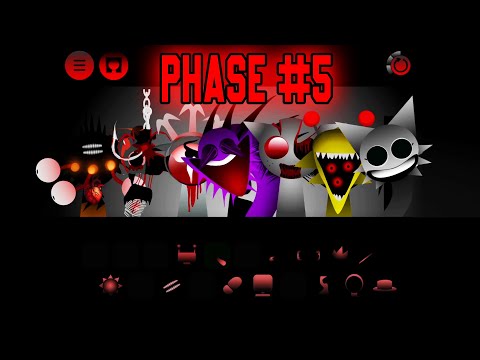
Sprunki Phase 5 is a horror music creation mod that brings customization into the Phase series in a way no earlier entry attempted. Beyond assigning sounds to characters, players can shape the visual stage itself: background lighting shifts from bright to dark, icon frame colors can be tuned across a spectrum from blood red to mysterious purple, and the overall aesthetic becomes a reflection of the player's stylistic choices as much as the horror theme's defaults. This layer of personalization gives Phase 5 a distinct identity within the series.
The character designs maintain the series' commitment to unusual, chaotic arrangements — the virtual band members have shapes that don't conform to friendly or familiar aesthetics, and their positions on stage feel deliberately disordered. The 20 available sound icons span a range from haunting to dazzling, supporting both horror-focused compositions and more melodic arrangements depending on how a player configures their stage setup and sound selections.
Phase 5 carries a content warning for its audio: the source material cautions that it is not suitable for players sensitive to sensational sounds. The sonic content can be startling and dissonant in ways that go beyond typical horror atmosphere. For players who can engage with that, Phase 5 offers the most personalizable experience in the Phase series while still delivering the unsettling visual and audio design the franchise is known for.
Key Details
- Genre: Horror Music Creation / Customizable Atmosphere Mod
- Difficulty Level: Easy (mechanics) / Medium (content)
- Average Play Time: 15–30 minutes per session
- Best For: Sprunki Phase fans who want stage customization, players who enjoy combining horror aesthetics with personal stylistic control
- Content Advisory: Contains sensational sounds that may startle sensitive players. Not recommended for those with sensitivity to unexpected audio.
How to Play Sprunki Phase 5
Getting Started
- Launch Phase 5 and begin by customizing the stage to your preferred aesthetic — select background lighting and icon frame colors before activating any sounds.
- Choose dark, blood red, or mysterious purple tones to set a horror-forward atmosphere, or lighter contrast colors for a more striking visual setup.
- Once the stage is configured, begin dragging and dropping sound icons toward characters to activate their loops.
- Observe each character's reaction to their assigned sound — unexpected changes in image and sound are part of Phase 5's design.
- Continue experimenting with the 20 available sounds; rearrange freely across characters without any scoring or submission requirements.
Basic Controls
Customize background lighting: Select from available lighting options
Change icon frame color: Select color option (blood red, purple, etc.)
Assign sound to character: Drag and drop sound icon onto character
Replace character sound: Drag new icon to overwrite existing
Experiment freely: Rearrange any combination at any time
Objective: Build horror or mixed-tone compositions using Phase 5's 20-sound library while personalizing the stage's visual aesthetic through background lighting and icon frame color customization. Create freely with no scoring requirements.
Sprunki Phase 5 Features & Highlights
- Stage customization system — background lighting and icon frame colors are player-adjustable, giving Phase 5 more visual personalization than any earlier Phase entry
- 20 sound icons — a full library spanning haunting to dazzling audio, supporting horror-specific and tonally varied compositions
- Unusual, chaotic character design — band members with non-standard shapes and disordered arrangements reinforce the horror-disorientation atmosphere
- Unexpected character reactions — sound activation triggers visual and audio surprises designed to startle, adding unpredictability to the composition process
- Dark color customization — blood red, mysterious purple, and dark hue options allow players to build an aesthetic identity that matches their compositional tone
Sprunki Phase 5 Tips & Strategies
Beginner Tips
- Configure the stage before activating sounds — the background lighting and frame colors set the emotional register for your session, and starting with a well-configured stage makes the composition feel more intentional.
- Dark hues (blood red, dark background) amplify the horror impact of Phase 5's more dissonant sounds; lighter contrast settings can make the same sounds feel different in tonal context.
- The content advisory about sensational sounds is genuine — if unexpected audio startles you easily, activate sounds one at a time with volume at a comfortable level rather than stacking several simultaneously.
Advanced Strategies
- Use the customization layer strategically: match icon frame colors to the emotional character of the sounds you're building around. Blood red frames with the most dissonant sounds create visual-audio coherence; purple frames tend to suit more mysterious, atmospheric compositions.
- Phase 5's 20-sound library spans a wide tonal range — identify the sounds you want as the composition's anchor before configuring the visual stage, then set the stage to aesthetically match your chosen sonic foundation.
- Treat unexpected character reactions as compositional information: if a specific icon assignment produces a reaction you didn't anticipate, note what combination triggered it and explore whether related combinations produce consistent patterns.
What to Watch Out For
- Phase 5's sound content can produce audio that is genuinely startling — this is explicitly by design. Manage your session volume and prepare for sudden tonal or intensity shifts.
- The customization options are session-specific; stage configurations don't persist between browser sessions.
Sprunki Phase 5 Elements Explained
Stage Customization System: Phase 5 introduces a visual personalization layer that distinguishes it from every other Sprunki Phase entry: players can adjust background lighting across a spectrum from bright to dark, and change icon frame colors among options including blood red, mysterious purple, and other dark hues. This customization changes the visual context in which the horror composition takes place — a blood-red frame around a dissonant sound feels different from the same sound in a purple or bright frame. The system allows players to build a stage aesthetic that matches their compositional intent before placing a single sound, making Phase 5 more of a directed creative experience than the default-look-take-it-or-leave-it approach of earlier Phase entries. The visual personalization also extends the session's creativity into a second dimension: players are making aesthetic decisions as well as musical ones.
20-Sound Icon Library: Phase 5 provides 20 sound icons spanning what the source material describes as a range from haunting to dazzling — an unusually broad tonal scope for a horror-series mod. This range means Phase 5 doesn't restrict players to purely dissonant or purely horror-adjacent sounds; some icons support genuinely melodic or atmospheric compositions rather than simply serving the horror aesthetic. This breadth makes Phase 5 accessible as a creative space for players who want the horror visual setting without exclusively horror audio, while still providing the more disturbing sound options for players building fully dark compositions. The 20-icon count also means the library is large enough to support extended experimentation without rapid exhaustion of new combinations.
Unexpected Character Reactions: A defining feature of Phase 5's sound activation mechanic is the deliberate unpredictability of character responses. Assigning an icon to a character triggers visual and audio changes that the source material frames as potentially startling — these are not predictable confirmation animations but surprise events designed to disrupt the player's expectation. This mechanic serves the horror atmosphere by maintaining tension even within the composition process: you never fully know what a new activation will produce. It also adds an exploratory dimension to experimentation — seeking out the most dramatic or unexpected reactions becomes a secondary creative goal alongside building a satisfying composition. Phase 5's reactions are generally less extreme than Phase 777's "unpredictable fate-of-souls" framing but more explicitly surprising than the earlier Phase entries' character animations.
Sprunki Phase 5 Frequently Asked Questions
Q: How do I change the stage appearance in Phase 5?
A: Access the background lighting and icon frame color options before or during your composition session. Select from the available color range — including blood red, mysterious purple, and dark tones — to set your preferred visual aesthetic.
Q: What should I do if a character reaction startles me unexpectedly?
A: Phase 5 carries a content advisory for sensational sounds and unexpected audio events — these are intentional design elements rather than glitches. If you find specific reactions too intense, reduce session volume and activate sounds one at a time rather than in rapid combination.
Q: Is Sprunki Phase 5 compatible with mobile devices?
A: Yes. The game is built in HTML5 and supports browser play on desktop, tablet, and mobile.
Q: Can I save my stage customization settings?
A: Sprunki Phase 5 is a browser-based mod without a persistent save system. Stage configurations and compositions exist for the duration of your active session.
Q: Is Sprunki Phase 5 an official Sprunki release?
A: No. Sprunki Phase 5 is a fan-made mod created by community members and is not an official product from the original Sprunki developers.
Games Like Sprunki Phase 5 You Might Enjoy
If you like Sprunki Phase 5, you might also enjoy:
- Nightmare Kart - it shares the same browser horror tension, quick decision-making, and replay-friendly pressure.
- Horror Tale 2 - it shares the same browser horror tension, quick decision-making, and replay-friendly pressure.
- Sprunki Pyramixed - it shares the same browser horror tension, quick decision-making, and replay-friendly pressure.