




Space Waves Overview
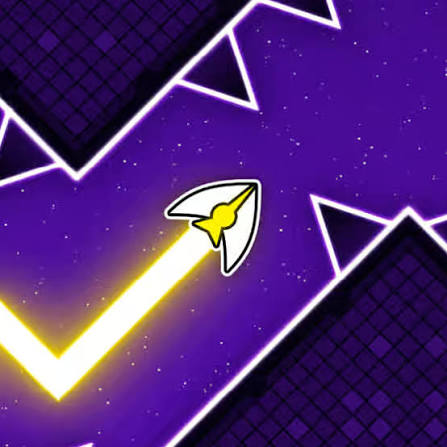
Space Waves is a one-button arcade game where you guide an automatically-advancing wave through narrow corridors in a minimalist space environment. Hold to move up, release to move down, and don't touch anything. That's the entire input. The complexity comes from what the levels put between you and the end.
The game's design philosophy is pure reduction: strip out everything except the core reflex challenge and make that challenge as demanding as possible within its constraints. Corridors narrow. Angles sharpen. Pacing accelerates. One contact ends the run. The aesthetic — clean, dark, minimal — serves the gameplay by keeping visual noise low and hazard readability high, which matters when the margins between the wave and the walls shrink to a few pixels.
Space Waves appeals to players who find the purest satisfaction in precision survival. There's no inventory, no upgrade system, no branching — just a wave, a corridor, and the question of whether your timing holds up. The instant restart keeps the retry pace tight, and the progressive level structure means improvement is always visible. Players who enjoy Geometry Dash-style reflex challenges or wave-survival arcade games will recognize the genre and find Space Waves a clean, competent entry with a well-calibrated difficulty curve.
Key Details
Genre: Arcade / Reflex / Precision Survival
Difficulty Level: Medium to Hard (escalates per level)
Average Play Time: 10–20 minutes per session
Best For: Reflex game fans, precision challenge players, fans of minimalist arcade games
How to Play Space Waves
Getting Started
- The wave begins moving forward automatically — you don't control its forward speed.
- Hold your input (mouse button, spacebar, or tap) to move the wave upward.
- Release to let the wave descend.
- Thread the wave through the corridor by alternating hold and release based on the gap positions.
- Reach the end of the level without contacting any wall, spike, or obstacle to progress.
Basic Controls
Move wave up: Hold Left Mouse Button / Spacebar / Tap and hold
Move wave down: Release input
Objective: Guide the wave from the start of each level to the end without hitting any obstacles. Levels escalate in difficulty through narrowing corridors, sharper angles, and faster pacing. Complete each level to unlock the next.
Space Waves Features & Highlights
- Single-input control scheme — hold to go up, release to go down; the entire skill expression of the game lives in the timing of those two states
- Escalating level difficulty — corridors narrow, angles sharpen, and pacing increases across levels with a well-calibrated progression curve
- Instant fail and retry — any contact ends the run immediately; instant restart maintains retry momentum
- Minimalist space aesthetic — high-contrast, low-noise visuals keep hazard edges clearly readable even at fast pacing
- Pure reflex challenge — no luck, no randomness, no equipment — every run is a function of timing precision alone
Space Waves Tips & Strategies
Beginner Tips
- Make small adjustments, not large ones. The wave's vertical speed is consistent — a brief hold moves it a short distance up, a long hold moves it far. Use short, controlled holds rather than holding for extended periods and releasing late.
- Look ahead of the wave, not at it. The next obstacle is what matters; by the time you react to a wall that's already adjacent, it's often too late at faster pacing.
- On any section that kills you repeatedly, slow your input timing by a fraction. Rushing the timing on difficult sections causes earlier input than the gap requires.
Advanced Strategies
- Identify each level's rhythm. Corridors in Space Waves often follow a hold-release-hold-release rhythm that maps to the gap geometry. Finding that rhythm and playing to it — rather than reacting to each individual wall — produces significantly steadier navigation.
- Anticipate the direction changes before corners arrive. Sharp angled sections require pre-positioning the wave before the turn geometry appears, not after — which means knowing the level's shape and beginning the input adjustment early.
- At high difficulty levels, minimize input changes during stable sections. Unnecessary hold/release oscillations in straight or wide corridors create instability that compounds when the next difficult section begins.
What to Watch Out For
- Over-correcting when the wave drifts toward a wall. A sharp input to avoid one wall often sends the wave into the opposite wall. Small, short corrections beat aggressive ones in tight corridors.
- Anxiety-driven early input. In anticipation of an upcoming narrow section, players often begin adjusting inputs before the section arrives — which can put the wave in a worse position than a neutral approach would have.
Space Waves Elements Explained
Hold-Release Control Mechanics: The hold-release input in Space Waves is deceptively simple but has real depth in application. Holding the input moves the wave upward at a consistent rate — longer holds move the wave farther up. Releasing allows it to descend at a consistent rate. The skill in Space Waves is managing the wave's vertical position within the corridor by modulating hold duration and release timing to thread gaps rather than crash into walls. At low difficulty, gaps are wide enough that imprecise timing works. At high difficulty, the gap between wall and wave can be a pixel or two at peak precision, meaning every hold duration and every release timing becomes load-bearing. Players who develop a feel for the wave's movement rate in relation to the corridor geometry — rather than reacting to walls as they appear — reach this level of precision significantly faster.
Level Progression and Difficulty Curve: Space Waves structures its difficulty across a series of discrete levels, each with a fixed geometric layout that the player navigates from start to finish. Unlike procedurally generated survival games, the corridor geometry is consistent within each level — what killed you on the third attempt is the same geometry that killed you on the first. This makes Space Waves learnable through repetition in a way that random obstacle games aren't: every death reveals specific information about the next attempt. Difficulty escalation across levels works primarily through three variables: corridor width (narrower gaps require more precision), angle severity (sharper turns require earlier input adjustment), and section pacing (faster advance speed compresses the reaction window). Later levels chain all three simultaneously.
Minimalist Visual Design: Space Waves' aesthetic is functional as much as stylistic. The dark background, clean corridor outlines, and single-color wave ensure that the critical visual information — where the corridor walls are and where the wave is relative to them — is immediately readable without visual noise. At high difficulty, where the wave and a wall can be within a pixel or two of each other, visual clarity is a gameplay necessity. The space environment theme provides ambient depth without competing with the functional foreground elements. Contrast between the wave and the corridor walls is maintained even at tight margins, which means player deaths from genuine timing errors rather than obscured hazards. This design approach is what allows Space Waves to use its minimal input system effectively — the simpler the control, the more the game depends on the player seeing exactly what's happening.
Space Waves Frequently Asked Questions
Q: How do I restart after failing a level?
A: The game restarts the level immediately on contact with any obstacle, or you can trigger a manual restart through the on-screen button or keyboard shortcut. Instant restarts keep the retry pace fast.
Q: What should I do if I keep hitting the same wall?
A: Reduce your input adjustment on the approach to that section. Players hitting the same wall repeatedly are usually adjusting too aggressively — a slightly smaller hold or a slightly earlier release resolves most repeated collisions on known obstacle positions.
Q: Is Space Waves compatible with mobile?
A: Yes. The hold-to-ascend, release-to-descend mechanic maps directly to touchscreen tap-and-hold controls. The game runs in browser on desktop, tablet, and mobile.
Q: Are levels randomized or fixed?
A: Levels are fixed — the corridor geometry is the same every attempt within a level. This makes Space Waves learnable through repetition; deaths provide specific information about the geometry that applies to every subsequent attempt.
Q: How many levels does Space Waves have?
A: The game features multiple levels that escalate in difficulty. The exact level count may vary by version — check the level select screen for the full available progression.
Games Like Space Waves You Might Enjoy
If you like Space Waves, you might also enjoy:
- Dashmetry - it shares the same browser horror tension, quick decision-making, and replay-friendly pressure.
- Block Blast - it shares the same browser horror tension, quick decision-making, and replay-friendly pressure.
- Golf Hit - it also focuses on finding routes, solving pressure-heavy problems, and escaping before danger closes in.