




Sprunki Doors Overview
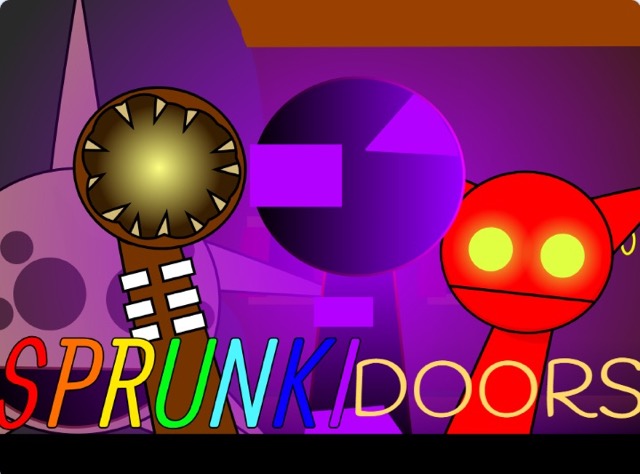
Sprunki Doors is a music creation mod that takes its name and conceptual framing from the idea of opening doors into unknown sonic territory. Each sound in the game's collection is a threshold — something waiting on the other side that you can't fully anticipate until you activate it. The mod leans into this metaphor through its 19-sound library, which spans a wider tonal range than most Sprunki variants, from gentle melodic loops to deliberately sinister audio that requires no horror mode to access. The full spectrum is available from the moment you launch.
What differentiates Sprunki Doors from other mods in the series is its integrated tonal design. Rather than separating cheerful composition from horror through a mode switch, the game blends both ends of the tonal spectrum into a single accessible library. The landscape shifts dynamically from bright to sinister as you layer sounds, responding to which characters you've activated rather than requiring you to deliberately toggle between experiences. This design makes Sprunki Doors approachable for players new to the horror side of the Sprunki ecosystem, while still delivering genuinely eerie moments for experienced players building darker compositions. The mute function and free experimentation mechanics give composers full control over the evolving soundscape without any submission pressure.
Key Details
- Genre: Music Creation / Atmosphere Mod
- Difficulty Level: Easy
- Average Play Time: 15–25 minutes per session
- Best For: Sprunki fans new to horror variants, creative players, music game enthusiasts who prefer integrated tonal design over hard mode switches
How to Play Sprunki Doors
Getting Started
- Launch the game and survey the character roster — note the full range of sound icons available from the start.
- Drag and drop a sound icon onto a character position to activate that character's unique audio loop.
- Layer multiple characters to build your composition, listening to how the tonal range shifts as you add both gentle and sinister sounds.
- Mute individual characters at any time to adjust the mix without fully removing them from your arrangement.
- Experiment freely across all 19 sounds — there are no scoring requirements or submission goals.
Basic Controls
Assign sound to character: Drag and drop sound icon onto character
Mute character: Click active character's mute option
Remove character from composition: Drag icon off character
Experiment with combinations: Freely layer any available sounds
Objective: Build layered music compositions using the 19-sound library across Sprunki Doors' full tonal spectrum — from gentle melodies to sinister audio — with no required goal beyond creative exploration.
Sprunki Doors Features & Highlights
- 19 unique sounds — a larger-than-standard sound library spanning gentle to sinister tones, all accessible without switching game modes
- Integrated tonal design — the landscape shifts dynamically from bright to eerie based on which characters are active, removing the need for a separate horror mode
- Mute function — silence individual character loops without removing them from the composition, enabling more precise mix management
- Accessible horror entry point — the blended tonal approach makes the mod suitable for players curious about darker Sprunki mods without committing to full horror aesthetics
- Familiar drag-and-drop system — standard Sprunki mechanics lower the barrier to entry while the expanded sound library adds depth for experienced composers
Sprunki Doors Tips & Strategies
Beginner Tips
- Start with the gentler sounds in the library and gradually add sinister ones — listening to how the tonal balance shifts helps you understand each sound's character before committing to a final arrangement.
- Use the mute function instead of removing characters when testing composition variations; it's faster to unmute than to re-drag an icon onto a character.
- The landscape responds to your active sounds — pay attention to background visual shifts as you add characters, as they signal where the tonal center of your composition is moving.
Advanced Strategies
- Build compositions with deliberate tonal contrast by pairing gentle melodic sounds with one or two sinister loops — the tension between light and dark elements tends to produce more interesting arrangements than fully committing to either end of the spectrum.
- Use the mute system as a compositional tool during listening sessions: mute half the composition to hear how specific sound groupings interact, then restore the full arrangement.
- Treat the 19-sound library as three loose categories (bright, neutral, sinister) and plan which proportion of each you want in the final composition before building.
What to Watch Out For
- Because all 19 sounds are available from the start without a mode gate, it's easy to activate sinister sounds accidentally while exploring the library. Preview sounds individually before committing them to the active arrangement.
- The dynamic landscape shifts can be surprising during early sessions — the environment responding to darker sound activations is intentional design, not a technical issue.
Sprunki Doors Elements Explained
19-Sound Library & Tonal Spectrum: Sprunki Doors' sound collection is its primary differentiator within the Sprunki mod landscape. The 19 unique loops cover a deliberately wide tonal range — gentle, ambient, and melodic sounds coexist in the same library as sinister, dissonant, and eerie tracks without any mode separation. This means every composition session in Sprunki Doors is inherently a navigation of the full emotional spectrum rather than a commitment to one end. Players can build purely gentle compositions, purely sinister ones, or — most interestingly — arrangements that blend both registers into something tonally complex. The library size also exceeds many standard Sprunki mods, giving experienced composers more raw material to work with across repeated sessions.
Dynamic Landscape System: Unlike mods with a static visual backdrop, Sprunki Doors features an environment that responds to the sounds currently active in your composition. Activating primarily gentle characters keeps the visual landscape bright and relatively calm; introducing sinister loops shifts the backdrop toward darker, more ominous imagery. This dynamic response creates a visual feedback system that reflects the tonal state of your music in real time, making the composition process feel more immersive than games where the visual presentation is disconnected from what you're building aurally. It also provides a useful compositional signal: if the landscape is darker than you intended, you've likely added more sinister characters than the mix needs.
Mute & Experimentation System: The mute function is a compositional tool that Sprunki Doors implements to give players finer control over the live mix than simple add/remove mechanics allow. Muting a character silences their loop without clearing them from the active arrangement — they remain in position, ready to be unmuted immediately. This allows for rapid A/B testing of different compositional states, non-destructive experimentation with sound combinations, and dynamic performance adjustments during a listening session. Combined with the mod's absence of scoring requirements or submission pressures, the mute system supports a genuinely exploratory approach to composition — one where players are encouraged to try unexpected combinations and modify them freely until something resonates.
Sprunki Doors Frequently Asked Questions
Q: How do I access the sinister sounds in Sprunki Doors?
A: All 19 sounds — including sinister and eerie loops — are available from the start without requiring a mode switch. Simply browse the full sound icon library and drag any icon onto a character position to activate it.
Q: What should I do if I want to remove one sound without rebuilding the whole composition?
A: Use the mute function to silence the specific character without removing them, then decide whether you want to permanently remove or simply adjust their contribution. Muting lets you test the composition without that sound before committing to the change.
Q: Is Sprunki Doors compatible with mobile devices?
A: Yes. The game is built in HTML5 and supports browser play on desktop, tablet, and mobile.
Q: Can I save my compositions?
A: Sprunki Doors is a browser-based mod without a persistent save system. Compositions exist for the duration of your active session.
Q: Is Sprunki Doors an official Sprunki release?
A: No. Sprunki Doors is a fan-made mod created by community members and is not an official product from the original Sprunki developers.
Games Like Sprunki Doors You Might Enjoy
If you like Sprunki Doors, you might also enjoy:
- Nightmare Kart - it shares the same browser horror tension, quick decision-making, and replay-friendly pressure.
- Horror Tale 2 - it shares the same browser horror tension, quick decision-making, and replay-friendly pressure.
- Sprunki Pyramixed - it shares the same browser horror tension, quick decision-making, and replay-friendly pressure.