


Death Forest Horror Multiplayer Overview
You're not alone in the forest. That's the good news. The killer already knows.
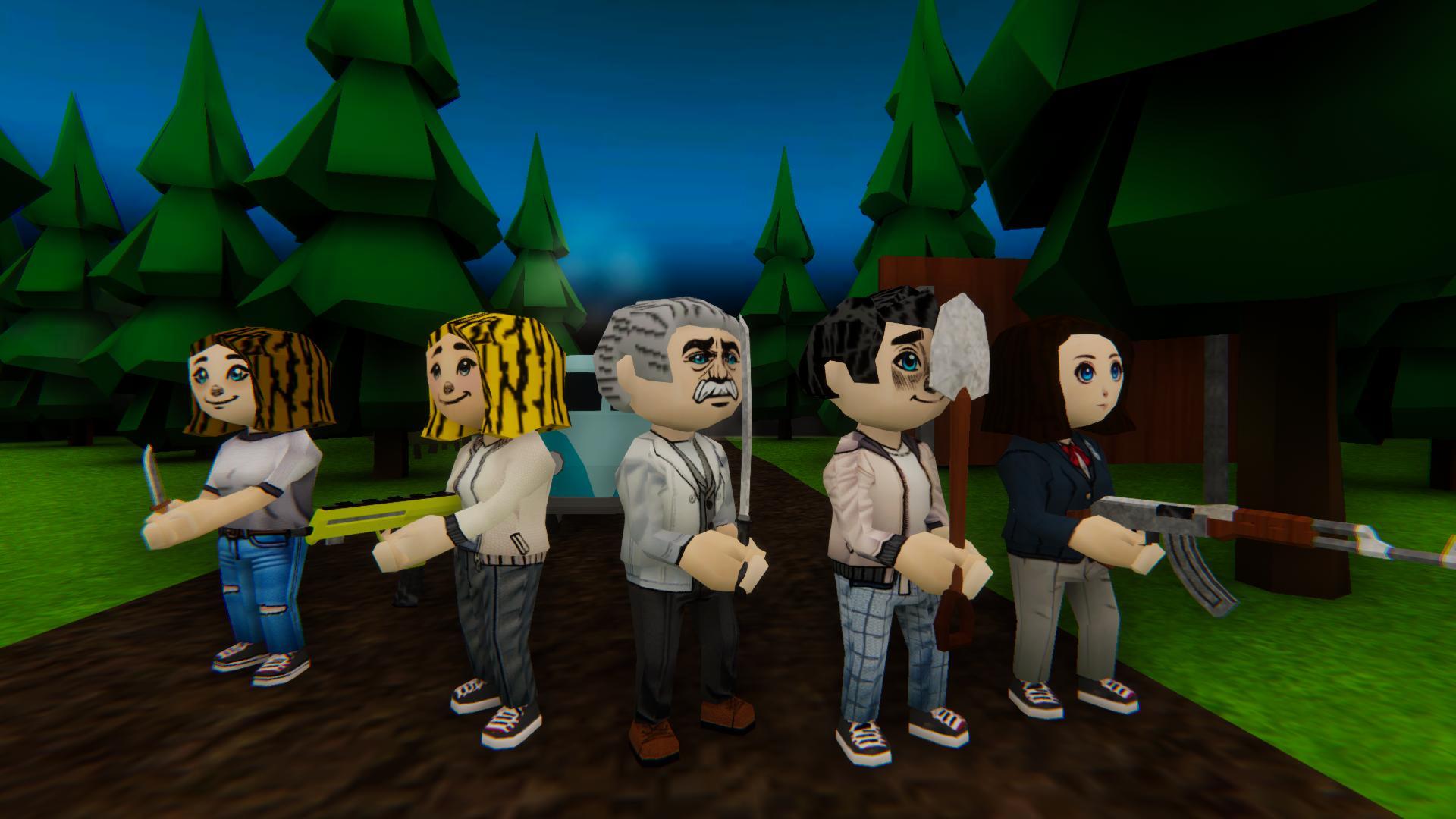
Death Forest: Horror Multiplayer is a free online cooperative survival horror game that puts you and other players into a dark, dangerous forest where a bloodthirsty killer is hunting everyone who enters. Your group needs to cooperate to gather items, solve tasks, repair your vehicle, and open the escape gates before the killer finds and eliminates you — all while managing the noise your actions create and the attention that noise attracts.
The game's multiplayer foundation changes the horror experience in ways that solo games can't replicate. Every action your team takes is louder than the action of a single player. Coordination saves lives; poor coordination creates the sounds that end runs. A well-organized team that communicates through voice chat (T) and moves efficiently through the forest can complete the escape objectives under the killer's radar. A disorganized one that generates too much noise, spreads too thin, or fails to coordinate on critical repairs finds the killer arriving faster than the objectives can be completed.
The forest itself is a genuinely threatening environment — its darkness, its scope, and the randomness of where the killer might be at any given moment create sustained tension that doesn't resolve between objectives. Oil, broken maps, repair parts, and random tools are scattered through the trees and clearings, requiring your team to spread out enough to cover the collection territory while staying close enough to support each other when the killer appears.
Cooperative, tense, and immediately accessible in any modern browser — Death Forest: Horror Multiplayer is the online horror game for groups who want to be scared together.
Key Details
| Genre | Cooperative Multiplayer Survival Horror |
| Difficulty Level | Variable (scales with team coordination quality) |
| Average Play Time | 20–40 minutes per session |
| Best For | Groups of friends looking for a free online horror experience, cooperative survival fans, and multiplayer horror players who enjoy objective-based team play under pursuit pressure |
How to Play Death Forest Horror Multiplayer
Getting Started
- Connect with other players and establish communication — use T for in-game voice chat to coordinate with teammates from the start. Assign initial search areas before spreading out so the group covers different parts of the forest rather than clustering in the same location.
- Identify the escape objectives immediately — your team needs to collect items, repair the vehicle, and open the escape gates. Understand which objectives are active and what items they require before the group disperses to search for them.
- Search for items across the forest — oil, broken maps, repair parts, and tools are distributed through the environment. Split search responsibilities across the team to cover more territory efficiently, but maintain enough proximity to respond when a teammate needs support.
- Manage noise at all times — everything your team does creates sound. Running (Shift) is louder than walking. Repairs generate noise. Interactions create audio that carries through the forest. The killer's attention is drawn to sound — coordinate noisy activities to minimize overlapping noise generation that amplifies your overall signal.
- Complete repairs and escape cooperatively — vehicle repair and gate opening require items collected from the forest and player presence at the repair location. Coordinate who carries what and who performs which repair to complete objectives efficiently rather than having multiple teammates converge on the same task while other objectives remain incomplete.
Basic Controls
| Input | Action |
|---|---|
| WASD / Arrow Keys | Move character |
| Mouse | Rotate camera / look around |
| E | Interact — pick up items, repair, open gates |
| Space | Jump (if available) |
| Shift | Run fast — use carefully, generates noise |
| T | Voice chat — talk to teammates in-game |
Objective
Work with your team to collect required items scattered through the forest, complete vehicle repair and other escape objectives, and open the escape gates before the killer eliminates the group. Manage noise generated by team activities to reduce the killer's awareness of your location. Coordinate through voice chat to complete objectives efficiently and escape before anyone is caught.
Death Forest Horror Multiplayer Features & Highlights
- Real-time multiplayer cooperation — play with friends or other online players in a shared horror environment where coordination is survival and poor teamwork accelerates danger
- Noise-based threat detection — team actions generate sound that attracts the killer, creating a coordination challenge where efficient objective completion and noise management are simultaneously active demands
- Forest exploration and item collection — oil, maps, repair parts, and random tools are distributed through the forest, requiring spread-out search patterns and cooperative carrying and delivery
- Vehicle repair escape mechanic — completing the escape requires collecting specific items and performing repairs at designated locations, giving the team clear objectives and a cooperative completion structure
- In-game voice chat — built-in voice communication via T enables real-time coordination without external apps, keeping the team's communication in the same space as the gameplay
Death Forest Horror Multiplayer Tips & Strategies
Beginner Tips
- Assign search zones before the team disperses. The forest's item distribution requires covering significant territory, but teams that spread randomly without coordination frequently miss entire areas while clustering in others. Before the group separates, roughly assign which player or pair searches which section of the forest — cardinal directions (one team north, one south) work as a simple division that ensures coverage without confusion.
- Call out item finds immediately via voice chat. When a player finds an item, announcing it over voice chat (T) tells the team which objectives are closer to completion and whether to continue their search in their current zone or redirect. Uncommunicated item finds create duplicate search efforts that waste time and spread the team's noise profile unnecessarily.
- Never run unless being actively chased. The Shift key sprint generates significant noise. New players in multiplayer horror games instinctively run to cover ground faster, but in Death Forest, the noise cost of running is paid by the whole team — a single running player can attract the killer to an area where multiple teammates are working. Walk by default; sprint only when the killer has been spotted and distance is the immediate priority.
Advanced Strategies
- Stagger noisy repair activities rather than simultaneous completion. Vehicle repair and gate opening generate sustained noise at a fixed location. If multiple repairs are completed simultaneously, the overlapping noise creates a large signal that pinpoints the team's location for the killer. Stagger repairs — complete one, allow the noise to dissipate, then begin the next — to reduce the peak noise signature from repair activities.
- Designate a lookout during repairs. The player performing a repair is focused on the repair interaction and has reduced situational awareness of approaching threats. Assigning a dedicated lookout — one player who does not interact with the repair but monitors the surrounding forest for killer approach — provides early warning that gives the repair player time to stop and hide rather than being caught mid-task.
What to Watch Out For
- Grouping entirely for perceived safety. Moving as a full group feels safer but creates a large, loud, highly visible team presence that is significantly easier for the killer to locate than spread individuals. Efficient teams cover more territory by spreading out while maintaining voice communication — full-group movement should be reserved for specific high-risk objectives rather than general forest navigation.
- Panic sprinting when the killer appears nearby. The immediate instinct when the killer is spotted is to sprint away at full speed. Full-speed sprinting in the same direction creates a predictable escape path and continuous loud noise that guides the killer's pursuit. Sprint to break initial line of sight, then transition to crouching or walking movement as soon as cover is available — quieter movement that doesn't announce your continued position.
Death Forest Horror Multiplayer Elements Explained
Cooperative Mechanics & Team Dynamics
The cooperative foundation of Death Forest: Horror Multiplayer is its most important gameplay dimension and the element that most determines whether a session ends in escape or elimination. Unlike solo survival horror where all decisions rest with one player, multiplayer distributes both the capabilities and the risks across the group — creating scenarios where individual actions have consequences for teammates who may be on the other side of the forest.
Noise management is the cooperative mechanic with the broadest impact. Every player action generates audio — movement, item interaction, repairs, sprinting. In a solo game, one player's noise is the game's entire noise budget. In multiplayer, every player's noise combines into a collective signal that the killer reads as a whole. A team that coordinates its noisy activities — staggering repairs, minimizing unnecessary sprinting, communicating positions to prevent accidental clustering — produces a significantly lower collective noise profile than one that doesn't.
Voice chat via T is the cooperative infrastructure the game is built around. Teams that communicate item finds, killer sightings, objective status, and individual positions consistently outperform those relying on positional inference alone. The in-game voice chat means no external coordination tool is required — the communication channel is in the same space as the game, keeping the team's attention unified rather than split between platforms.
Item Collection & Escape Objectives
The escape objectives of Death Forest require two sequential capabilities: finding the required items distributed through the forest and delivering them to the repair and gate locations where they're needed. Both capabilities require spread-out search coverage and coordinated item delivery that uses the team's voice communication to bridge the distance between where items are found and where they need to go.
Items include oil, broken maps, repair parts, and random tools — each relevant to specific escape objectives. The forest's item distribution is broad enough that comprehensive coverage requires the team to split into search zones, creating the individual player exposure that makes the killer a genuine threat rather than a nuisance. Players searching alone are quieter individually but more vulnerable to the killer than a full group — the risk/efficiency trade-off is the central tension of the collection phase.
Escape gate opening is the final objective and requires items collected during the forest search phase to be present at the gate location. Coordinating who carries the required items and when to converge on the gate — balancing the completion urgency against the noise cost of multiple players moving toward the same location simultaneously — is the team coordination challenge the escape phase is built around.
The Killer & Threat Management
The killer in Death Forest: Horror Multiplayer is a persistent, weapon-carrying hunter whose presence in the forest is constant from the session's beginning. Armed typically with an axe or similar weapon, the killer moves through the forest actively searching for the team rather than waiting to be triggered by proximity. Any spotted player becomes an immediate target, and the killer's pursuit is determined rather than easily lost.
Threat management in multiplayer is fundamentally different from solo horror games because the killer is responding to the team's collective noise profile rather than a single player's position. A team that generates coordinated, minimal noise is responding to across a large territory — harder to locate and harder to converge on than a noisy, clustered group. Individual awareness of how much noise you're generating, and how that combines with what your teammates are doing simultaneously, is the specific situational skill multiplayer horror develops.
Hiding, running, and noise avoidance are the three evasion tools available. Hiding removes you from the killer's search space; running creates distance but announces position through noise; noise avoidance reduces detection likelihood before it becomes necessary. The most effective teams use all three in the right situations — hiding when discovered mid-objective, running only to break pursuit, and noise avoidance throughout normal operation.
Death Forest Horror Multiplayer Frequently Asked Questions
Q: How do I coordinate with teammates who I don't know?
A: Use T to activate voice chat and introduce yourself and your intended search area at the start of the session. Even brief coordination — "I'll check the north section" — reduces duplicate effort and ensures the forest gets covered efficiently. For teams of strangers, defaulting to simple positional callouts ("killer near the east clearing," "found repair parts at the central area") provides the minimum coordination needed for effective cooperative play without requiring complex pre-game planning.
Q: What should I do when the killer finds me and my teammates are doing repairs?
A: Immediately call out the killer's location via voice chat (T) so your teammates know to stop generating noise and prepare to hide or run. Draw the killer away from your teammates' repair location by running in a different direction rather than toward them — leading the killer to active repair locations eliminates the players doing the most critical work. Once you've broken line of sight with the killer, communicate your position and status to the team.
Q: Is this game compatible with all browsers and devices?
A: Death Forest: Horror Multiplayer is a free online game designed for modern desktop browsers. Chrome and Firefox on a current desktop or laptop provide the best multiplayer performance and the most stable voice chat functionality. The game uses WASD/Arrow Keys for movement, mouse for camera, E for interaction, Shift for sprint, and T for voice chat — a control scheme that requires a keyboard and mouse setup. Mobile browser compatibility is not guaranteed for the full multiplayer experience.
Q: Can I play solo, or is a team required?
A: Death Forest is designed as a cooperative multiplayer experience — the game's objectives, noise management system, and territory coverage requirements are all built around team play. Solo play may be possible technically but removes the cooperative dimension that defines the game's design. Playing with at least one or two teammates provides the intended experience; public matchmaking can fill team slots if a pre-made group isn't available.
Q: How do we know when we're close to escaping vs. failing?
A: Monitor the escape objective status — item collection progress, repair completion, and gate access are all visible to the team. Coordinate through voice chat on which objectives are complete and which remain. The killer's activity level and proximity can signal whether the team's noise budget has been exceeded — a killer that has been consistently close without direct detection suggests the team's noise profile is higher than ideal. Complete the highest-priority objectives first (vehicle repair before gate opening), and converge on the gate only when all required items are in hand and the team has a clear path to the exit.
Games Like Death Forest Horror Multiplayer You Might Enjoy
If you like Death Forest Horror Multiplayer, you might also enjoy:
- Dead By Daylight - it matches the same high-pressure horror pacing with dangerous enemies and fast decisions.
- Nightmare of Decay - it matches the same high-pressure horror pacing with dangerous enemies and fast decisions.
- Forsake the Rake - it matches the same high-pressure horror pacing with dangerous enemies and fast decisions.