





About Observation Job: Morgue
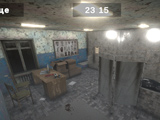
Observation Job: Morgue turns a night shift into an eight-hour surveillance challenge. The camera rooms can change in unsettling ways: lighting may flicker, furniture can move and a ghost may appear. Your job is to notice what has changed and record it through the report menu.
Build a Reference for Each Room
At the beginning of the shift, move through the camera views using the on-screen arrows. Take note of a few fixed features in each room: where the furniture stands, how the lighting looks and which objects belong in the scene. These initial observations give you a reference for later visits.
Use a consistent order when switching cameras. Instead of staring at one suspicious area for the entire shift, compare each view with its own baseline. A moved object is easier to spot when you remember both where it was and what surrounded it.
Report an Anomaly
When something differs from the earlier view, open the report or context menu and select the category that matches what you observed. A change in lighting, a displaced object and an unfamiliar figure call for different descriptions, so identify the change before selecting a report.
After reporting, return to the other cameras and keep watching. Your task lasts for the full shift, and attention to one room should not prevent you from checking the rest.
Controls
| Input | Action |
|---|---|
| Click the on-screen arrows | Change camera view |
| Click an anomaly category in the menu | Report the observed change |
Practical Tips
- Start with prominent reference points before trying to memorise every small object.
- Compare the same section of a room on each visit to make changes easier to notice.
- Decide what changed before opening the report menu.
Frequently Asked Questions
Why examine the cameras before reporting anything?
The original room layouts provide the baseline for spotting later changes.