


FNAF 7: Ultimate Custom Night Overview
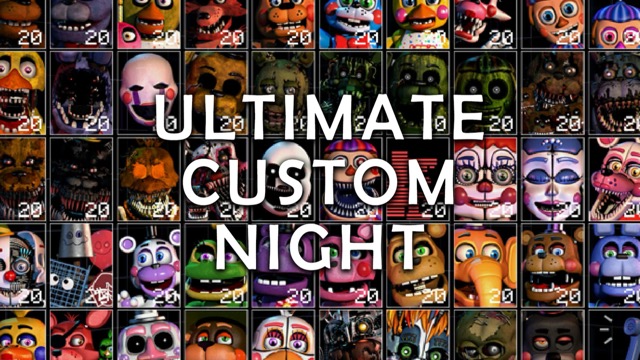
Every animatronic. Every night. Your rules. FNAF 7: Ultimate Custom Night is the definitive endgame experience for Five Nights at Freddy's — a survival horror challenge builder that hands you a roster of over 50 animatronics and lets you decide exactly how hard tonight is going to be. Set each one from 0 (inactive) to 20 (maximum aggression) and build the nightmare you deserve.
For new players, that means a gentle introduction: drop most animatronics to zero, run a handful at low settings, and use the game to learn the behaviors of individual characters without being overwhelmed. For veterans, it means something else entirely — the legendary 50/20 Mode, where every single animatronic runs at maximum difficulty simultaneously, creating what many consider the hardest challenge in the entire franchise. Most players will spend their time somewhere between those poles, crafting combinations that test specific skills or explore the interactions between animatronics whose behaviors overlap in unexpected ways.
The office itself is a familiar space, but the systems you manage here are more numerous and interconnected than any previous FNaF game. Cameras, doors, vents, heaters, music boxes, Faz-Coins, and traps — all of them tools, all of them necessary at different moments, none of them sufficient alone. Earning achievements unlocks secret cutscenes, alternate office skins, and hidden content that rewards mastery rather than just survival. Ultimate Custom Night is, in many ways, the complete expression of everything the FNaF series has learned about tension, resource management, and player-defined difficulty.
Key Details
- Genre: Survival Horror / Strategy
- Difficulty Level: Fully customizable (from beginner-friendly to nearly impossible)
- Average Play Time: 10–20 minutes per session (varies widely with custom configuration)
- Best For: Series veterans who want a configurable challenge and completionists pursuing achievements and hidden content
How to Play FNAF 7: Ultimate Custom Night
Getting Started
1. Open the animatronic selection screen before each night and set each character's activity level — start with a small number of animatronics at low settings to learn individual behaviors before adding complexity. 2. Begin your shift and open the camera system to track animatronic positions across the office and connected spaces. 3. Monitor all active defense systems — doors, vents, heaters, and music boxes each require attention at different times depending on which animatronics are active. 4. Manage your power supply: keeping doors shut or vents sealed drains electricity, so open defenses as soon as the immediate threat has passed. 5. Survive from 12:00 AM to 6:00 AM to complete the night and earn your star rating.
Basic Controls
- Mouse: Navigate camera feeds, click to close doors, activate tools, and operate all office systems
- Camera Monitor: Toggle open to view animatronic positions across all connected areas
- Door/Vent Controls: Click to seal or open specific access points around the office
- Environment Tools: Click dedicated icons to operate the heater, music box, Faz-Coin dispenser, and traps
- Power Indicator: Displayed on the HUD — monitor throughout the night to avoid blackout
Objective: Survive until 6:00 AM against whatever combination of animatronics you have configured. Adjust the roster and difficulty between attempts to build toward harder challenges, unlock achievements, and discover hidden content.
FNAF 7: Ultimate Custom Night Features & Highlights
- Over 50 animatronics with individual behaviors — the largest and most diverse roster in the series, each character requiring a different defensive response
- Fully adjustable difficulty per animatronic — 0–20 settings for every character let you build any challenge from introductory to theoretically maximum difficulty
- Multiple office management systems — cameras, doors, vents, heaters, music boxes, and traps all operate independently and must be coordinated simultaneously
- Achievement-based unlockables — completing specific challenges unlocks secret cutscenes, alternate office skins, and hidden content that rewards mastery
- 50/20 Mode as the ultimate challenge — setting all animatronics to level 20 simultaneously creates what is widely considered the hardest single challenge in the FNaF franchise
FNAF 7: Ultimate Custom Night Tips & Strategies
Beginner Tips
- Start with five or fewer animatronics at settings of 5 or below. This gives you enough threat to practice with while keeping the management load learnable. Add more animatronics and increase settings only once you're reliably surviving current configurations.
- Learn one animatronic at a time. Activate only Freddy, for example, at level 10, and survive a full night focused entirely on his behavior. That focused experience makes managing him in a full roster much easier.
- Never keep a door sealed longer than necessary. The power cost of a held-shut door is the most common reason players run out of electricity before dawn — close, confirm the threat has passed, reopen immediately.
Advanced Strategies
- Build roster combinations around compatible defense systems. Animatronics that all respond to camera monitoring pair better together than a mix of camera-managed and vent-managed threats, which forces your attention in too many directions simultaneously.
- Use Faz-Coins strategically, not reactively. Spending coins on traps before a threatening animatronic reaches a critical position is more effective than spending them after you're already in danger — anticipation beats reaction in high-difficulty configurations.
- For 50/20 Mode specifically, follow documented survival guides. At maximum settings, the configuration is precise enough that improvised strategies rarely succeed — the community has mapped reliable approaches to this challenge that are worth studying before attempting.
What to Watch Out For
- Don't neglect the heater and music box just because they feel passive. Several animatronics are specifically countered by these systems — ignoring them because nothing feels immediately threatening is exactly when those animatronics advance to striking distance.
- Don't add too many animatronics too quickly. The satisfaction of a hard custom configuration comes from genuine mastery of the behaviors involved. Jumping to a 20-animatronic roster before understanding each character creates a chaotic experience where failure feels random rather than instructive.
FNAF 7: Ultimate Custom Night Elements Explained
The Animatronic Roster and Customization: Ultimate Custom Night's roster draws from across the entire FNaF series — original characters, variants, nightmares, and new additions are all represented. Each animatronic has its own AI behavior pattern and requires a specific defensive response: some are deterred by camera monitoring, some require doors or vents to be sealed, some are countered by heaters or music boxes, and some respond to completely unique mechanics found nowhere else in the game. The 0–20 activity slider for each character controls how frequently and aggressively they act — at 0, they are completely inactive; at 20, they operate at maximum speed and persistence. Building a custom configuration means selecting which threats to face and understanding how their behaviors will interact over the course of a full night.
Office Management Systems: The office in Ultimate Custom Night is equipped with more defensive tools than any previous FNaF game. Doors block direct entry from the hallways on each side. Vents can be sealed to prevent animatronics from crawling through the ductwork. The heater raises the office temperature to deter specific cold-sensitive animatronics. Music boxes play audio that keeps certain animatronics calm and non-aggressive. Faz-Coins accumulate over time and can be spent on traps that temporarily disable or redirect specific threats. Each system costs power or resources when active, and managing them simultaneously — keeping each relevant system operational for the right threat at the right moment without draining power — is the central strategic challenge of the game.
Achievement and Unlock System: Ultimate Custom Night rewards challenge completion through a tiered achievement system. Surviving specific preset configurations, reaching certain difficulty thresholds, or completing nights under particular conditions unlocks achievements tied to rewards. These rewards include secret cutscenes that add new pieces to the FNaF lore, alternate visual skins for the office environment, and hidden content that expands on characters and events from across the series. The achievement system provides long-term progression beyond simple survival, giving players who have mastered the core mechanics a series of increasingly specific challenges that continue to reward engagement well past the initial completion of the standard configurations.
FNAF 7: Ultimate Custom Night Frequently Asked Questions
Q: How do I set up a custom night configuration?
A: From the main menu, open the animatronic selection screen. Each character has a slider from 0 to 20 — set each one to your desired activity level. Characters set to 0 are inactive for the night. Confirm your selection and begin the shift.
Q: What should I do if the power runs out before 6 AM?
A: All systems fail simultaneously at zero power, leaving you defenseless. Prevention is the only reliable approach — open doors and vents immediately after threats clear, use heaters and music boxes only when specifically needed, and monitor the power indicator proactively. Adjusting your configuration to fewer or lower-difficulty animatronics reduces the defensive actions required and extends your power budget.
Q: Is 50/20 Mode actually survivable?
A: Yes, but it requires precise execution of a specific survival strategy rather than general good play. The FNaF community has documented reliable approaches to 50/20 Mode — studying those resources before attempting it is strongly recommended, as improvised strategies at maximum difficulty rarely succeed.
Q: How do I unlock secret cutscenes?
A: Cutscenes are tied to specific achievements earned by completing designated challenge configurations or reaching difficulty milestones. Review the achievement list from the main menu to identify which configurations unlock which rewards, then build your custom night around meeting those conditions.
Q: Can I save my progress and configurations?
A: Completed nights and earned achievements are saved automatically. Custom configurations can typically be saved or recalled between sessions — check the configuration screen for save slot options before closing the game.
Games Like FNAF 7: Ultimate Custom Night You Might Enjoy
If you like FNAF 7: Ultimate Custom Night, you might also enjoy:
- FNAF Shooter - it shares the same animatronic pressure, survival timing, and quick browser play rhythm.
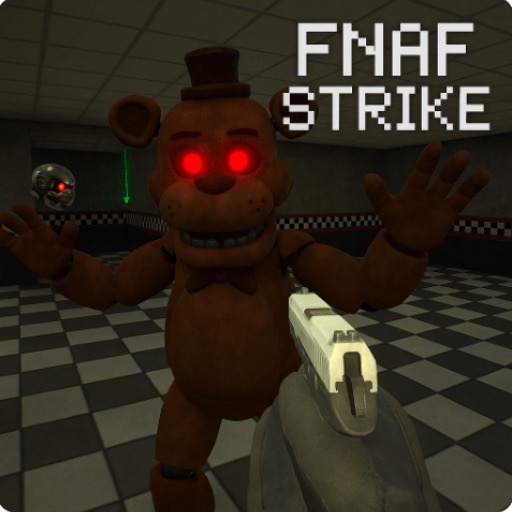
- FNAF Strike - it shares the same animatronic pressure, survival timing, and quick browser play rhythm.
- FNAF Shooter 2 - it shares the same animatronic pressure, survival timing, and quick browser play rhythm.