



FNF Fazbear Fight: Freddy vs Purple Guy Overview
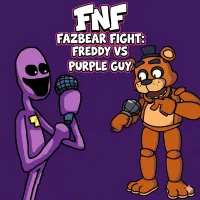
FNF Fazbear Fight: Freddy vs Purple Guy is a fan-made crossover that merges two of gaming's most beloved indie universes into one electrifying rhythm showdown. Taking the musical mechanics of Friday Night Funkin' and injecting them with the haunting atmosphere of Five Nights at Freddy's, this mod delivers something that feels both familiar and completely fresh.
You step into the role of Purple Guy — not as a villain lurking in shadows this time, but as a competitor standing across from Freddy Fazbear on a musical battlefield. The stakes are simple: hit your notes, hold your rhythm, and outlast the animatronic icon in a head-to-head duel that blends creepy FNAF energy with the fast-paced intensity that Friday Night Funkin' fans love.
What makes this mod stand out is its original track, "Fazbears-Fight" — a custom composition that captures the eerie, tension-filled mood of the FNAF universe while keeping the driving beat essential to FNF-style competition. The result is a song that feels genuinely new rather than borrowed, and it's catchy enough to stick with you long after the screen fades.
The haunting visual presentation reinforces the tone at every turn. Familiar FNAF aesthetics — dim lighting, unsettling character design, that persistent sense that something is off — are layered over the rhythm gameplay to create an atmosphere that elevates it beyond a standard FNF mod. Whether you're a FNAF devotee, an FNF regular, or simply someone who likes their rhythm games with a side of dread, Fazbear Fight delivers a concise, polished, and genuinely engaging experience.
Key Details
| | | |---|---| | Genre | Rhythm / Music Game (Fan-Made Mod) | | Difficulty Level | Variable — Easy, Normal, and Hard modes available | | Average Play Time | 5–15 minutes per session | | Best For | FNF fans, FNAF enthusiasts, rhythm game players, fans of crossover mods |
How to Play FNF Fazbear Fight: Freddy vs Purple Guy
Getting Started
1. Select your difficulty level before starting — Easy is recommended for players new to FNF-style rhythm gameplay. 2. When the track begins, watch the arrows scrolling upward toward the judgment line at the top of the screen. 3. Press the matching arrow key or WASD key in sync with each note as it reaches the judgment line. 4. Maintain your combo by hitting consecutive notes accurately — breaking your streak weakens your position in the duel. 5. Outperform Freddy by keeping your accuracy high throughout the full track to win the fight.
Basic Controls
- Arrow Keys or WASD — Tap in sync with incoming notes
- Enter Key — Start or pause the game
Objective
Hit incoming notes in time with the music to fill your score meter and outperform Freddy Fazbear. Missing notes drops your accuracy and shifts momentum toward your opponent. Your goal is to maintain rhythm and combo consistency from start to finish across the full "Fazbears-Fight" track. Successfully completing the song with a high accuracy rating wins the duel.
FNF Fazbear Fight: Freddy vs Purple Guy Features & Highlights
- Original "Fazbears-Fight" track — A custom composition that blends FNAF's creepy atmosphere with FNF's driving rhythm energy, purpose-built for this mod
- FNAF x FNF crossover aesthetic — Iconic visual design elements from both franchises combined into a cohesive, atmospheric presentation
- Multiple difficulty settings — Easy, Normal, and Hard modes allow players of any skill level to find the right level of challenge
- Combo-based competitive system — Sustaining note streaks is the key to winning, rewarding consistency and focus over burst performance
- Tight, focused experience — A single high-quality track and a polished duel scenario deliver a complete, satisfying session in minutes
FNF Fazbear Fight: Freddy vs Purple Guy Tips & Strategies
Beginner Tips
- Start on Easy Mode even if you have FNF experience — the "Fazbears-Fight" track has its own rhythm patterns worth learning before jumping to harder difficulties.
- Focus your eyes on the judgment line, not on the notes as they scroll up. Watching where notes land rather than where they begin gives you better reaction timing.
- Don't panic during fast note sequences — dropping a few notes is recoverable, but tensing up and rushing usually breaks your combo entirely.
Advanced Strategies
- Memorize the rhythm pattern of "Fazbears-Fight" rather than relying purely on reaction speed. The track has a consistent structure — knowing what's coming next significantly improves your accuracy.
- On Hard Mode, shift from reactive play to anticipatory play. Read note clusters a beat ahead and position your fingers before the hit, not during it.
- If you repeatedly fail at the same section, isolate it — restart, focus only on that passage's pattern, and repeat until the muscle memory clicks before attempting a full run.
What to Watch Out For
- Late reactions on fast sections — The most common failure point is waiting to see a note fully before pressing. Train yourself to press slightly earlier than feels natural on quick sequences.
- Losing focus during the atmospheric buildup — The track's creepy ambient sections can lull you into a false sense of ease before tempo spikes. Stay engaged even when the beat temporarily softens.
FNF Fazbear Fight: Freddy vs Purple Guy Elements Explained
The Rhythm Duel System
FNF Fazbear Fight's core mechanic is a head-to-head musical duel between Purple Guy and Freddy Fazbear. Both characters occupy opposite sides of the screen, and your performance directly affects the visual momentum of the battle — hit your notes cleanly and your side of the meter fills; miss them and Freddy gains ground. This creates a push-pull tension that makes every note feel consequential beyond just a score number. The duel framing also connects the rhythm gameplay to the FNAF narrative context, making the competition feel like a genuine confrontation rather than an abstract score challenge. Winning requires sustained accuracy across the entire track, not just a strong start or a late surge.
Note Input & Combo System
Notes in Fazbear Fight scroll upward in four lanes corresponding to the left, down, up, and right arrow keys (or WASD). When a note reaches the judgment line, pressing the matching key scores a hit; missing it breaks your combo. Combo streaks are the primary driver of competitive performance — sustained chains of accurate hits push your meter significantly further than scattered perfect notes interrupted by misses. The game rewards consistency above all else. A player who hits 90% of notes without breaking their combo will consistently outperform one who alternates between perfect streaks and frequent drops. Learning to prioritize rhythm continuity over chasing individual perfect timing is the key mental shift for improvement.
"Fazbears-Fight" Original Track
The original track is the centrepiece of this mod and what elevates it beyond a simple reskin. "Fazbears-Fight" was composed specifically for this crossover — it isn't pulled from either source franchise. The composition uses FNAF's signature unsettling tonal palette (minor keys, ambient noise, sudden dynamic shifts) and layers it over a propulsive FNF-style beat that keeps the energy high throughout. The track has a distinct structure: an atmospheric opening that establishes the mood, a mid-section tempo escalation that tests your reaction speed, and a climactic final section that demands everything you've learned. Understanding the track's architecture helps you anticipate and prepare for its most demanding passages.
FNF Fazbear Fight: Freddy vs Purple Guy Frequently Asked Questions
Q: How do I start a song in FNF Fazbear Fight?
A: From the main menu, select your difficulty level, then press Enter to begin the track. Once the song starts, arrows will begin scrolling upward toward the judgment line. Press the matching arrow key or WASD key as each note arrives at the line.
Q: What should I do if I keep failing the same section of the track?
A: Focus on that specific passage rather than restarting full runs repeatedly. Identify the note pattern causing the failure, slow down your mental processing of it, and repeat until the timing becomes instinctive. The track has consistent patterns — once a section is memorized, it stops being a reaction challenge and becomes muscle memory.
Q: Is FNF Fazbear Fight compatible with mobile devices?
A: FNF Fazbear Fight is optimized for desktop play using keyboard controls. Mobile compatibility may be limited, as the arrow key input system is designed for keyboard use. Desktop with a full keyboard provides the most reliable experience.
Q: Can I save my high scores?
A: Score tracking is session-based. Your performance is displayed at the end of each run, but scores are not permanently saved between sessions. Challenge yourself to beat your personal best each time you play.
Q: How do I unlock harder difficulty modes?
A: All difficulty modes — Easy, Normal, and Hard — are available from the start with no unlock requirements. Select your preferred difficulty from the menu before beginning a run and switch freely between sessions as your skills improve.
Games Like FNF Fazbear Fight: Freddy vs Purple Guy You Might Enjoy
If you like FNF Fazbear Fight: Freddy vs Purple Guy, you might also enjoy:
- Five Nights at Freddy's - it shares the same animatronic pressure, survival timing, and quick browser play rhythm.
- Five Nights at Freddy's 2 - it shares the same animatronic pressure, survival timing, and quick browser play rhythm.
- Five Nights at Freddy's 3 - it shares the same animatronic pressure, survival timing, and quick browser play rhythm.